How to homogenize vendor datasheets into one internal spec
Every supplier sends a different format. Extract each onto your internal schema and render them all into one template. Shown on two real vendor epoxy datasheets from 3M and Henkel Loctite.

Manufacturing and R&D teams have a quiet, expensive problem. Every supplier sends technical data in its own format, its own field names, its own units, its own test standards. The receiving team then retypes all of it into the one internal template their operations, their engineers, and their quality system actually run on. Multiply that by hundreds of materials and dozens of vendors and it is a full-time job that produces nothing but transcription.
It is the same shape whatever you make. The parts change; the pain does not. So here is how to solve it with bem, using two real, public vendor datasheets for the same class of material: a two-part structural epoxy, one from 3M and one from Henkel Loctite.
The inputs: same material, two different sheets
Both products are two-part structural epoxies an engineer would evaluate side by side. The datasheets look nothing alike.
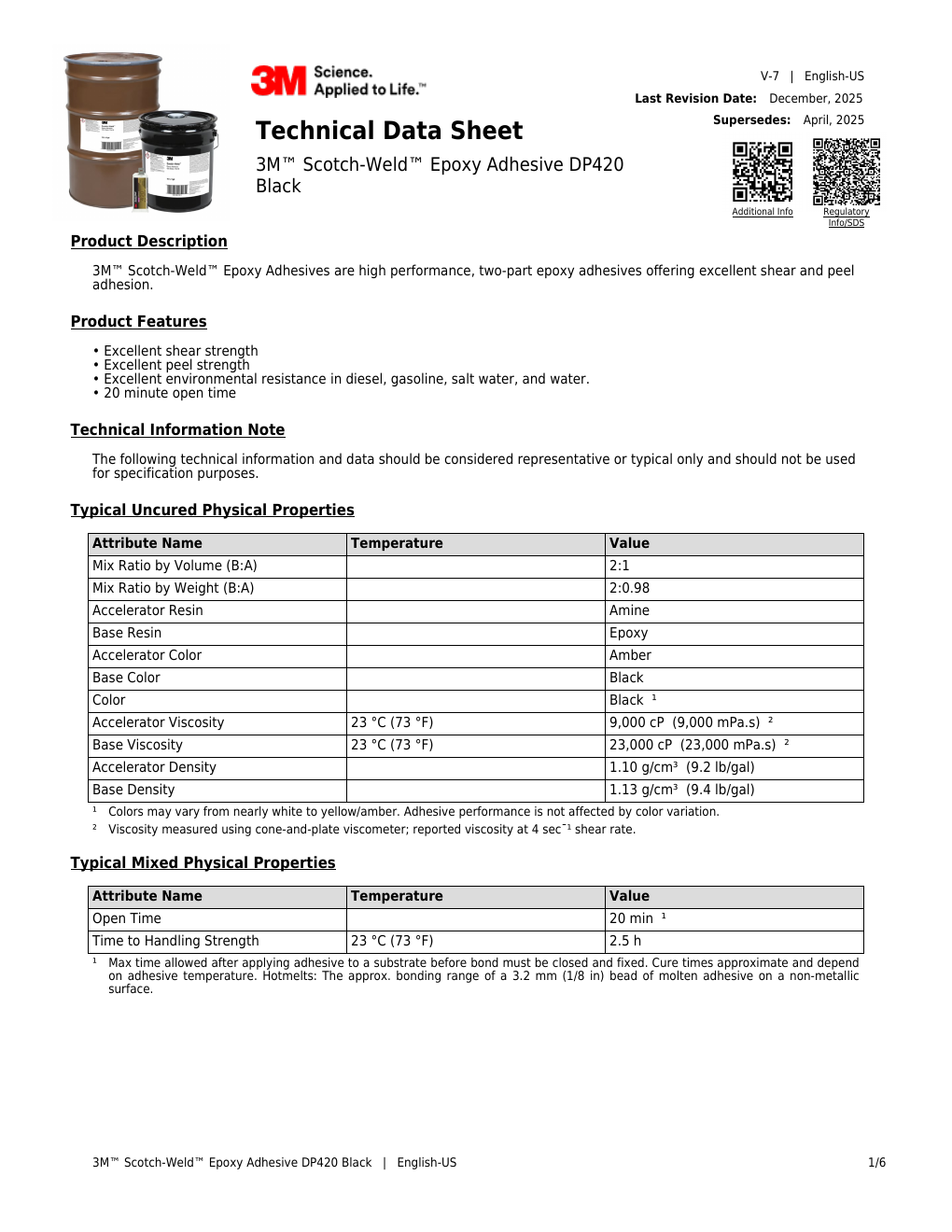
3M Scotch-Weld DP420. Calls the parts "Base" and "Accelerator," gives viscosity in cP, mix ratio as "B:A," strengths in MPa.
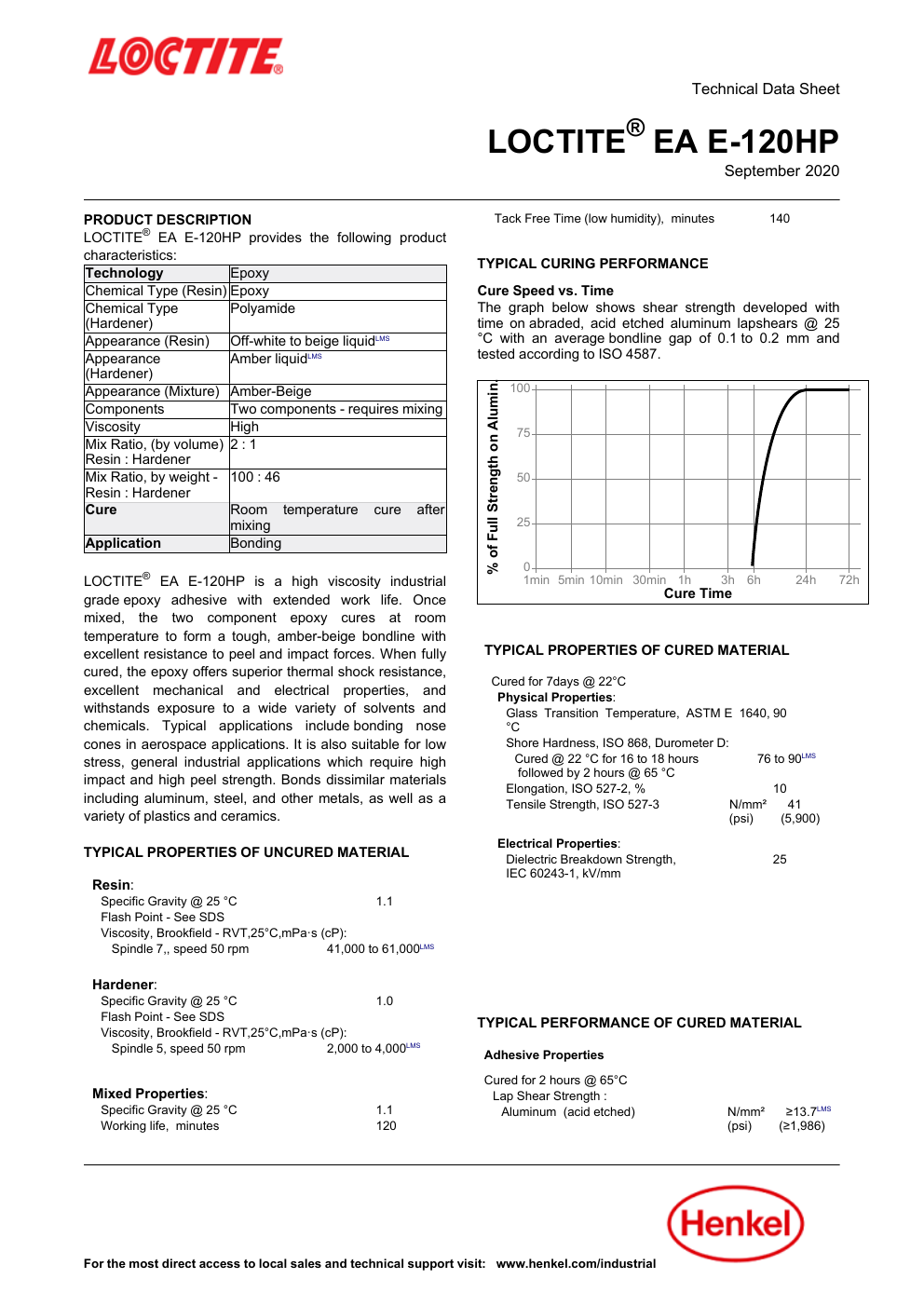
Henkel Loctite EA E-120HP. Calls the parts "Resin" and "Hardener," gives viscosity qualitatively ("High"), mix ratio "100:46" by weight, strengths in N/mm² against ISO and ASTM test methods.
Different labels, different units, different standards, different layout. A merge tool cannot touch this, because there is no clean record to merge, and no two suppliers agree on what the record even looks like.
The move: one internal schema, applied to both
Instead of a template per vendor, you define your internal spec once as an Extract schema, and map every vendor's sheet onto it. This is the whole trick: the schema is your standard, and Extract does the translation.
{ "type": "object", "description": "Map a vendor two-part epoxy datasheet onto our internal material spec. Copy values verbatim with units. If the datasheet does not state a field, return an empty string.", "properties": { "productName": { "type": "string" }, "manufacturer": { "type": "string" }, "resinType": { "type": "string", "description": "Base/resin chemistry." }, "hardenerType": { "type": "string", "description": "Hardener/accelerator chemistry." }, "mixRatioByVolume": { "type": "string" }, "mixRatioByWeight": { "type": "string" }, "mixedViscosity": { "type": "string", "description": "Verbatim, even if qualitative like 'High'." }, "workLife": { "type": "string" }, "fullCure": { "type": "string" }, "shearStrengthSteel": { "type": "string" }, "shearStrengthAluminum": { "type": "string" }, "tensileStrength": { "type": "string" }, "glassTransitionTemp": { "type": "string" }, "serviceTemperature": { "type": "string" } }, "required": ["productName", "manufacturer", "resinType"]}Run each datasheet through it, and both collapse onto the same fields. 3M's "Base/Accelerator, 2:0.98 by weight, 22.8 MPa" and Loctite's "Resin/Hardener, 100:46 by weight, 30 N/mm²" now sit in the same rows. The units stay verbatim, because normalizing them is a decision your engineers should own, not one an extractor should make silently.
Render both into the one template
Author your internal spec as a single .docx with a property table and a gaps section, then render every vendor's normalized data into it:
INTERNAL MATERIAL SPECIFICATIONMaterial: {{ product }}   |   Vendor: {{ vendor }}
{{p spec }}{{p gaps }}
Here are the two real vendor sheets, rendered into the identical internal template:
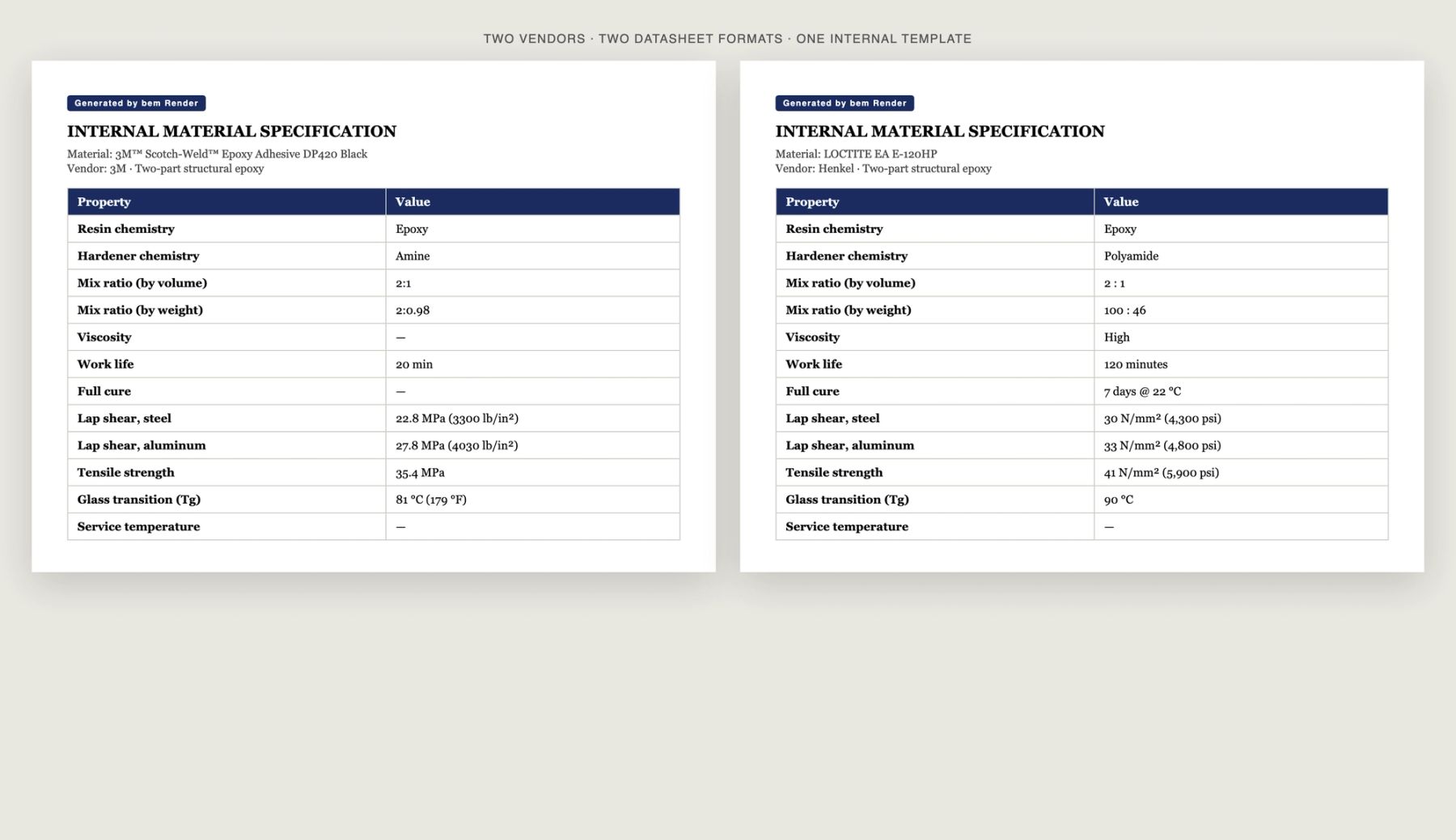
Two vendors, two source formats, one internal template. The values are real and verbatim from each datasheet.
What the empty cells are doing
Look at the dashes. The 3M sheet never states a full-cure schedule, a mixed viscosity, or a service temperature; the Loctite sheet omits a service temperature. bem did not invent those values to make the document look finished. It left them blank and listed them under "Fields not stated on this vendor's datasheet," so the engineer knows exactly what to go ask the supplier for.
That is the difference between homogenizing and guessing. You get one clean, comparable spec per material, in your template, with the gaps made explicit instead of papered over. The transcription job disappears; the judgment stays with your team.
The same pattern works for coatings, resins, alloys, electronic components, or any material where every vendor sends a different sheet and you need one internal record.
The build above runs on the public bem API. [Start here.](https://app.bem.ai/auth/sign-up)