How to turn a shipping document into a clean confirmation
Extract the details from the document you received, reconcile against your records with Enrich, and render a standardized confirmation. Shown on a real public bill of lading.

Operations teams live in this loop. A document arrives, an invoice, a purchase order, a bill of lading, in whatever layout the sender used. Someone reads it, matches the details to internal records, and produces a clean, standardized document back: an order confirmation, a remittance, a shipment confirmation. The inputs are a mess and the output has to be exact.
This is a bem workflow: Extract, optionally Enrich, then Render. To keep it concrete, we ran it on a real, public bill of lading, a NileDutch liner B/L for a container moving from China to the Republic of the Congo.
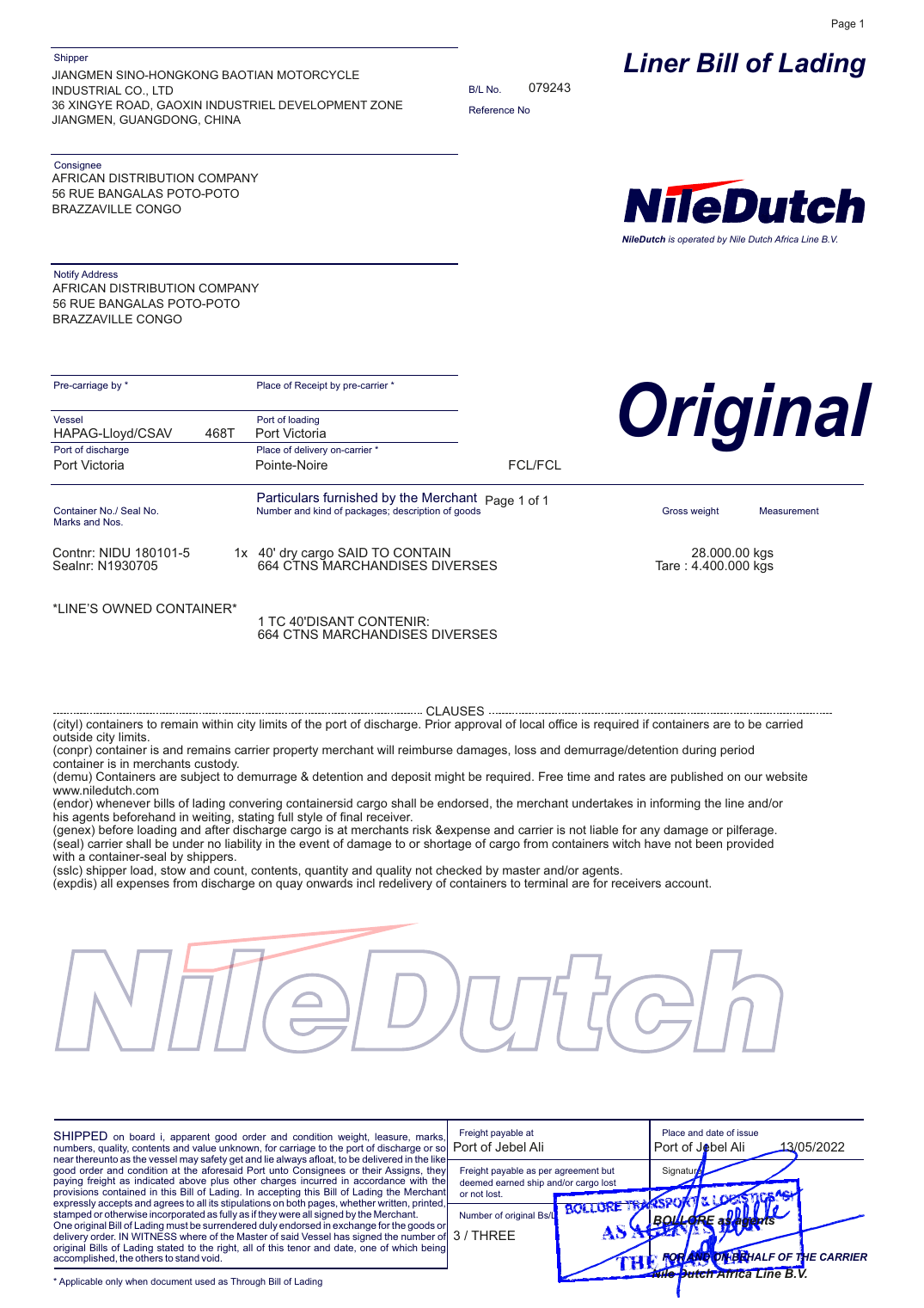
The real input: a public NileDutch liner bill of lading. Dense, multi-block, half in French. This is what "the document you received" actually looks like.
The pattern
inbound document (PDF/scan) -> Extract pull the header + line details, verbatim -> Enrich match against your own records (customer, SKU, terms) -> Render produce the standardized confirmation .docx1. Extract what the confirmation needs
Write a schema for the fields your confirmation carries, and tell the model to copy values verbatim. Real documents are messy: this B/L lists weight as 28.000.00 kgs and mixes English and French. You want what is there, not a cleaned-up guess.
{ "type": "object", "description": "Extract a bill of lading. Copy values verbatim.", "properties": { "blNumber": { "type": "string" }, "carrier": { "type": "string" }, "shipper": { "type": "string" }, "consignee": { "type": "string" }, "portOfLoading": { "type": "string" }, "portOfDischarge": { "type": "string" }, "placeOfDelivery": { "type": "string" }, "containerNumber": { "type": "string" }, "packages": { "type": "string" }, "grossWeight": { "type": "string" } }, "required": ["blNumber", "shipper", "consignee"]}Run on the real B/L, bem returned the values cleanly: blNumber: 079243, carrier: NileDutch, the full shipper and consignee blocks, containerNumber: NIDU 180101-5, packages: 1x 40' dry cargo SAID TO CONTAIN 664 CTNS MARCHANDISES DIVERSES.
2. Reconcile with Enrich (optional)
For invoices and POs, the sender's SKU and price are what they claim, not necessarily what you agreed. An Enrich step matches each line against a Collection of your catalog or customer master and attaches your canonical record. Point the source field at the value that is always present, the item description is usually more reliable than a SKU that is often missing.
{ "type": "enrich", "functionName": "catalog-enrich", "config": { "steps": [{ "sourceField": "lineItems", "collectionName": "product_catalog", "targetField": "catalogMatch", "topK": 1, "searchMode": "hybrid" }]}}3. Author the confirmation template
A normal .docx with inline header fields and block tables:
SHIPMENT CONFIRMATIONB/L Number: {{ bl_number }}   |   Carrier: {{ carrier }}Shipper: {{ shipper }}Consignee: {{ consignee }}
{{p routing }}{{p cargo }}{{p flags }}
{{ }} is inline text, {{p }} is a block. Upload it and bem derives the placeholder and style contract from the file.
4. Render, and here is the actual output
Compose the routing and cargo tables from the extracted values and send the data through the workflow. bem returned this finished .docx:
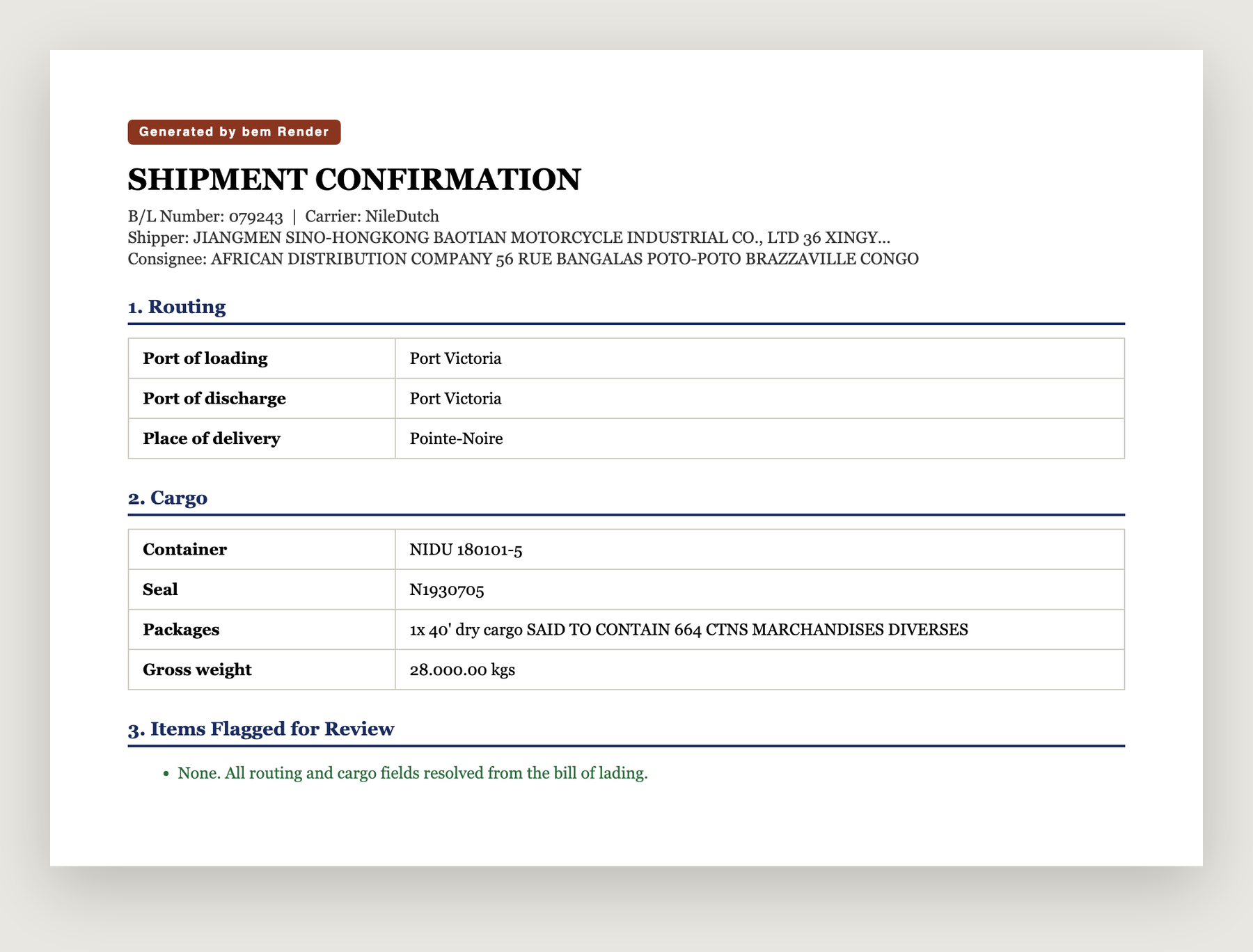
Generated from the real B/L. Routing (Port Victoria to Pointe-Noire), the container and seal, 664 cartons, 28,000 kg, and a review section that resolved cleanly because every field was present.
Why the review section matters
The temptation with document automation is to make the output look finished no matter what. That is how a wrong weight or a missing consignee slips into a confirmation nobody re-reads. bem does the opposite: Render will not silently fill a field it cannot resolve, and anything ambiguous surfaces in a review block instead of getting written as fact. On this B/L everything resolved, so the review section says so. On the next one, if the place of delivery is missing, it will tell you.
The same three functions handle an invoice into an order confirmation, a purchase order into an acknowledgment, or a bill of lading into a shipment confirmation. One document in, one clean document out.
The build above runs on the public bem API. [Start here.](https://app.bem.ai/auth/sign-up)