How to abstract a contract with bem Render
Extract the terms from a dense agreement, render a clean source-attributed summary, and keep every value traceable. Grounded in DigitalOcean's real credit-agreement amendment.
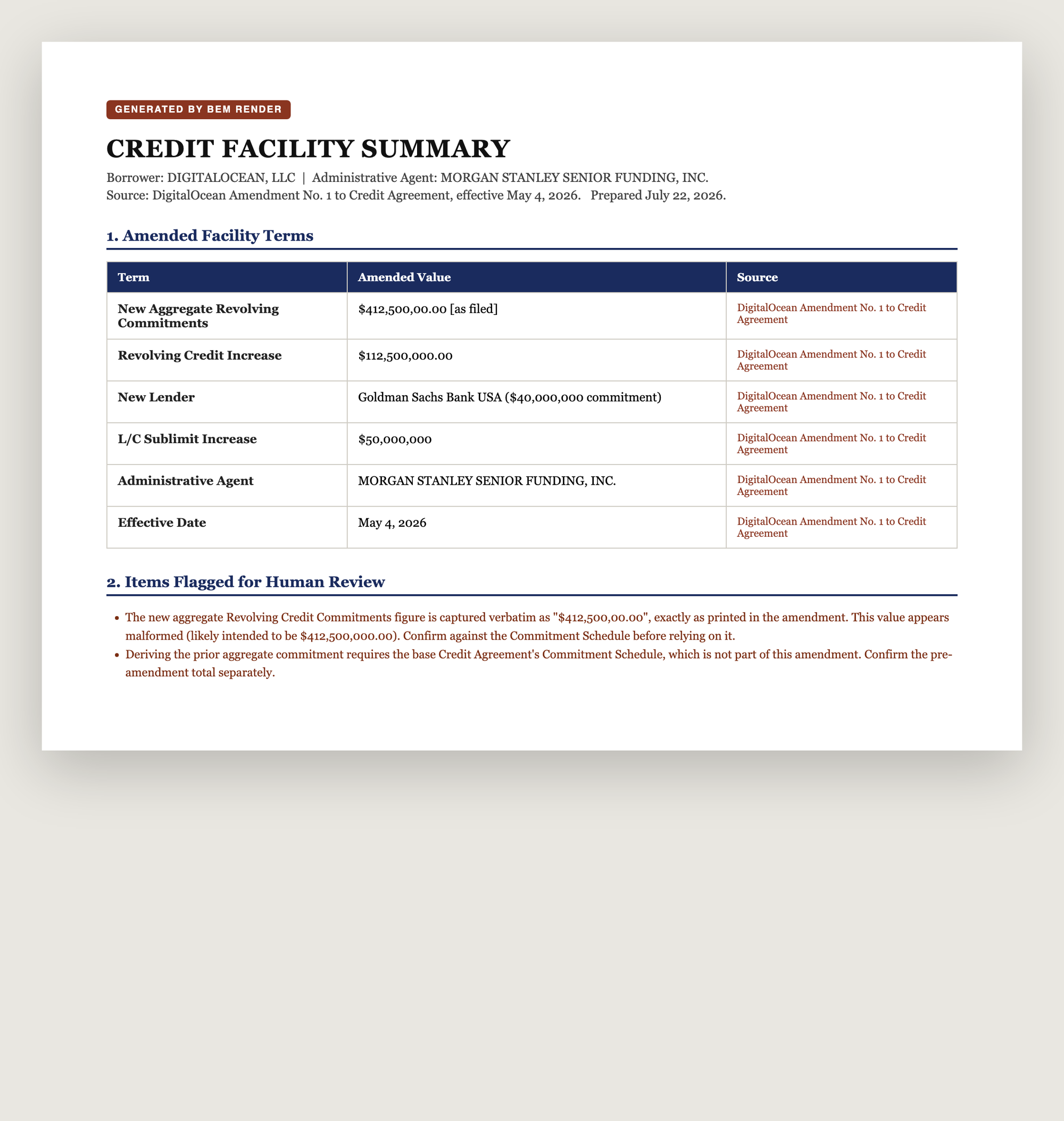
Contract and facility abstraction is one of the most common document jobs in the enterprise and one of the least automated. A legal-ops analyst reads a 30-page agreement or amendment and produces a one-page summary of the terms that matter. A treasury team does the same for every credit-facility amendment. It is high-volume, high-stakes, and today it is mostly done by hand, because the input is a dense legal PDF, not a clean record.
This is the exact shape bem was built for: unstructured document in, verified structured document out. Here is how to build it with two functions, Extract and Render, with bem.

The real input: DigitalOcean's Amendment No. 1 to Credit Agreement, a public SEC exhibit. Dense, defined-term-heavy legalese. This is what an analyst is handed.
The pattern
source contract (PDF) -> Extract (structured terms + source pages) -> Render (.docx summary)Extract pulls the terms out of the legalese. Render places them into a template you control. Because both run in one workflow, the summary is built from the source document in a single call, and every value can be tied back to the page it came from.
1. Define what a summary needs
Write an Extract schema for the terms your summary must carry. Keep the instruction explicit about copying figures verbatim. This matters more than it looks: legal documents contain malformed and unusual figures, and you want the model to report what is there, not a tidied-up guess.
{ "type": "object", "description": "Extract the amended terms from a credit-agreement amendment. Copy every figure verbatim exactly as printed; do not normalize or correct numbers.", "properties": { "amendmentTitle": { "type": "string" }, "effectiveDate": { "type": "string", "description": "Verbatim." }, "parentBorrower": { "type": "string" }, "administrativeAgent": { "type": "string" }, "additionalLender": { "type": "string" }, "newAggregateRevolvingCommitments": { "type": "string", "description": "New aggregate commitment amount, verbatim exactly as printed." } }, "required": ["amendmentTitle", "parentBorrower"]}Create it as an Extract function with POST /v3/functions and "type": "extract".
2. Author the summary template
Make a normal .docx in Word or Google Docs. Mark inline values with {{ key }} and blocks with {{p key }}. A facility summary usually wants a title, a couple of inline fields, a terms table, and a review section:
CREDIT FACILITY SUMMARYBorrower: {{ borrower }}   |   Agent: {{ agent }}
{{p facility_terms }}
Items Flagged for Human Review{{p review_flags }}
Upload it when you create the Render function. bem reads the file and derives the contract, the placeholder set and the style catalog, so you never hand-maintain a schema in a proprietary syntax.
3. Compose the values
The table and the review list are block primitives. A table is rows of cells with a template style; a list is items you compose in code from the extracted fields:
{ "borrower": "DIGITALOCEAN, LLC", "agent": "Morgan Stanley Senior Funding, Inc.", "facility_terms": [ { "table": { "styleId": "TableGrid", "rows": [ ["Term", "Amended value", "Source"], ["New Aggregate Revolving Commitments", "$412,500,00.00 (as filed)", "Amendment No. 1"], ["New Lender", "Goldman Sachs Bank USA ($40,000,000)", "Amendment No. 1"] ] }} ], "review_flags": [ { "list": { "kind": "bullet", "items": [ { "contents": [{ "paragraph": { "text": "The aggregate commitment is captured verbatim as \"$412,500,00.00\", exactly as filed. It appears malformed. Confirm against the Commitment Schedule." }}]} ]}} ]}That flag is not a contrivance. When we ran this on DigitalOcean's real amendment, the filed document contained a malformed commitment figure. bem captured it exactly as written rather than silently normalizing it, and the summary surfaced it for a human to confirm. That is the behavior you want in front of a credit committee.
4. Run it
Send the source document through the workflow. Render returns a finished .docx:
body = { "callReferenceID": "facility-summary-001", "input": { "singleFile": { "inputType": "pdf", "inputContent": "<base64 of the amendment>" } }}# POST /v3/workflows/<name>/call?wait=trueThe response carries a short-lived download URL for the finished document.
What you get that a merge tool cannot give you
- The summary is built from the source, not from a clean record you had to assemble first.
- Every value is anchored to its source page, so the abstract is auditable.
- Render refuses to guess. A missing or mismatched field is rejected before output, and ambiguous source values are flagged, not buried.
Contract abstraction stops being a person reading a PDF and retyping it, and becomes a workflow you call once per document.
The build above runs on the public bem API. [Start here.](https://app.bem.ai/auth/sign-up)