How to turn a PDF into structured JSON without writing a parser
A hands-on guide. Go from a raw invoice PDF to validated, schema-shaped JSON in a single bem API call, with a full trace you can audit. Real request, real response, no parser required.

Every team that runs on documents has the same quiet, expensive tax. A PDF arrives. An invoice, a purchase order, a shipping confirmation, a datasheet. Someone opens it, reads it, and retypes the fields into the system that actually runs the business. Multiply that by thousands of documents a month and you have a full-time job that produces nothing but transcription, plus the errors that come with it.
The usual engineering answer is to write a parser. Regex for one vendor. A template for another. A brittle pipeline that breaks the first time a supplier moves a column. This guide shows the other way. You will take a raw invoice PDF and get back clean, schema-shaped JSON in a single API call, with a trace you can audit. No parser, no template, no per-vendor rules.
TL;DR. Define the JSON you want as a schema, create anextractfunction, wrap it in a workflow, then POST your PDF withwait=true. bem returns structured data constrained to your schema and a full execution trace. The whole path is four requests and works on any supported file type, not just PDFs.
The document we will process is a real vendor invoice. Every request below turns this exact PDF into the same structured JSON, field for field.
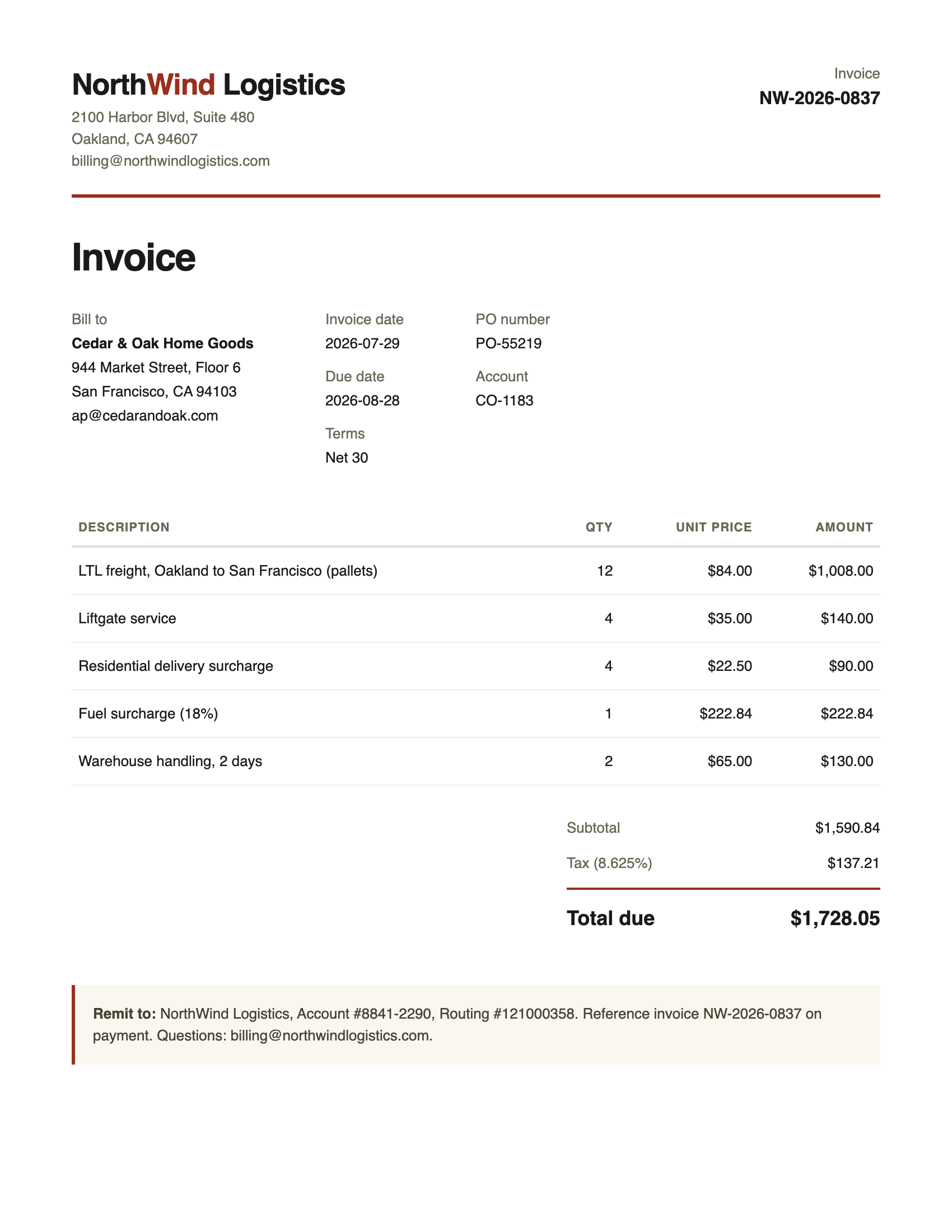
The source PDF: NorthWind Logistics invoice NW-2026-0837. This is the one document used in every example that follows.
What you will build
By the end of this guide you will have a reusable endpoint that turns a document into typed data. Concretely:
- An
extractfunction whose output is constrained to a JSON Schema you define. - A workflow that wraps that function into a single, versioned entry point.
- A synchronous call that accepts a PDF and returns validated JSON in one request.
- A trace URL that shows exactly what happened, so you can prove the result rather than trust it.
Before you start
You need three things: a bem account, an API key, and a terminal. Sign up at app.bem.ai, then create a key under Settings, API Keys, and export it so every command can read it from the environment.
export BEM_API_KEY='your-api-key-here'The examples below use curl so nothing is hidden behind a client. bem also ships official SDKs for TypeScript, Python, Go, and C#, plus a CLI, if you would rather not hand-roll requests. The bem API is v3, authenticated with the x-api-key header.
Step 1: Describe the output you want
Start from the answer, not the document. In bem, a JSON Schema is the contract for what you get back. You are not writing rules for how to read the page. You are describing the shape of the data you want, and the field descriptions double as instructions to the model.
Here is a schema for a typical invoice. Save it as invoice-schema.json. The required array is the part most people skip and should not. It is how you tell bem which fields are not optional.
{ "type": "object", "required": ["invoiceNumber", "vendor", "totalAmount"], "properties": { "invoiceNumber": { "type": "string", "description": "Unique invoice identifier" }, "invoiceDate": { "type": "string", "description": "Invoice date (YYYY-MM-DD)" }, "dueDate": { "type": "string", "description": "Payment due date (YYYY-MM-DD)" }, "vendor": { "type": "object", "properties": { "name": { "type": "string" }, "address": { "type": "string" } } }, "billTo": { "type": "object", "properties": { "name": { "type": "string" }, "address": { "type": "string" } } }, "poNumber": { "type": "string", "description": "Purchase order number" }, "lineItems": { "type": "array", "items": { "type": "object", "properties": { "description": { "type": "string" }, "quantity": { "type": "number" }, "unitPrice": { "type": "number" }, "amount": { "type": "number" } } } }, "subtotal": { "type": "number" }, "taxAmount": { "type": "number" }, "totalAmount": { "type": "number" }, "currency": { "type": "string", "description": "ISO 4217 currency code" } }}Step 2: Create an extract function
A function is the smallest unit of work in bem. Create one of type extract and hand it the schema. This command reads the schema file from Step 1 and registers the function.
curl -X POST https://api.bem.ai/v3/functions \ -H "Content-Type: application/json" \ -H "x-api-key: $BEM_API_KEY" \ -d '{ "functionName": "invoice-extractor", "type": "extract", "displayName": "Invoice Extractor", "outputSchemaName": "Invoice", "outputSchema": '"$(cat invoice-schema.json)"' }'bem returns the function id and a version number. Functions are immutably versioned, so once this is live you can change the schema later without breaking calls that pin an earlier version.
{ "function": { "functionID": "fn_2abc123xyz", "functionName": "invoice-extractor", "type": "extract", "currentVersionNum": 1 }}Step 3: Wrap the function in a workflow
A workflow is the thing you actually call. For a single function it is one node and no edges, but the same primitive lets you chain classify, split, extract, enrich, and send steps into a DAG later without changing how clients call it.
curl -X POST https://api.bem.ai/v3/workflows \ -H "Content-Type: application/json" \ -H "x-api-key: $BEM_API_KEY" \ -d '{ "name": "invoice-processing", "displayName": "Invoice Processing", "mainNodeName": "invoice-extractor", "nodes": [ { "name": "invoice-extractor", "function": { "name": "invoice-extractor" } } ] }'You now have a stable entry point named invoice-processing. That name is all a client needs to know.
Step 4: Send a PDF and get JSON back
This is the whole point, and it is one request. Post the file to your workflow with wait=true and bem blocks until the result is ready, up to 30 seconds. Longer jobs return a pending call you can poll or receive by webhook instead.
curl -X POST "https://api.bem.ai/v3/workflows/invoice-processing/call?wait=true" \ -H "x-api-key: $BEM_API_KEY" \ -F "wait=true" \ -F "callReferenceID=invoice-001" \ -F "file=@invoice.pdf"The response below is the actual, unedited output from running this on a sample logistics invoice. bem read the vendor, the bill-to, every line item, the fuel surcharge, the tax, and the total, and returned them in exactly the shape the schema asked for. The function finished in about 2.4 seconds.
{ "call": { "callID": "wc_2ghi789def", "status": "completed", "workflowName": "invoice-processing", "callReferenceID": "invoice-001", "finishedAt": "2026-08-05T23:11:01Z", "outputs": [ { "eventType": "extract", "transformedContent": { "invoiceNumber": "NW-2026-0837", "invoiceDate": "2026-07-29", "dueDate": "2026-08-28", "poNumber": "PO-55219", "currency": "USD", "vendor": { "name": "NorthWind Logistics", "address": "2100 Harbor Blvd, Suite 480, Oakland, CA 94607" }, "billTo": { "name": "Cedar & Oak Home Goods", "address": "944 Market Street, Floor 6, San Francisco, CA 94103" }, "lineItems": [ { "description": "LTL freight, Oakland to San Francisco (pallets)", "quantity": 12, "unitPrice": 84, "amount": 1008 }, { "description": "Liftgate service", "quantity": 4, "unitPrice": 35, "amount": 140 }, { "description": "Residential delivery surcharge", "quantity": 4, "unitPrice": 22.5, "amount": 90 }, { "description": "Fuel surcharge (18%)", "quantity": 1, "unitPrice": 222.84, "amount": 222.84 }, { "description": "Warehouse handling, 2 days", "quantity": 2, "unitPrice": 65, "amount": 130 } ], "subtotal": 1590.84, "taxAmount": 137.21, "totalAmount": 1728.05 } } ], "errors": [], "traceUrl": "/v3/calls/wc_2ghi789def/trace" }}Notice what did not happen. There was no OCR step to configure, no coordinate math, no template tied to this vendor. Point it at a different invoice with a different layout and the same call returns the same shape.
Step 5: How do you know it did not guess?
This is the question that separates a demo from production, and it is where bem is built differently. Two things keep the output honest.
First, the schema is a hard constraint, not a suggestion. The model cannot return a field you did not define or a type you did not ask for. A number stays a number. Structure is guaranteed before you ever see the response.
Second, every call is fully traceable. The response includes a traceUrl. Follow it and you get the complete execution record for that call: the function version that ran, each step, and the evaluation bem performed on its own output.
curl "https://api.bem.ai/v3/calls/wc_2ghi789def/trace" \ -H "x-api-key: $BEM_API_KEY"bem auto-evaluates every transformation with an LLM judge that checks for hallucination and scores relevance, and it measures function accuracy against your corrections over time. When the output is not good enough, bem is designed to reject it rather than ship a confident wrong answer. You extract data you can measure and audit, not data you have to hope about.
What this replaces
The one-call version above stands in for a stack that teams usually build and maintain themselves.
| Concern | Do it yourself | bem extract |
|---|---|---|
| Read the file | OCR engine, layout parser, per-format handling | Handled, any supported file type |
| Find the fields | Regex and templates tuned per vendor | Your schema, no per-vendor rules |
| Guarantee structure | Hand-written validation and type coercion | Output constrained to your schema |
| A new layout appears | Rewrite rules, redeploy | Same call, same shape |
| Prove it is right | Build your own review and metrics | Trace and evaluation built in |
| Total to maintain | A pipeline and a team | One schema and one endpoint |
Going further: parse, memory, and other file types
Extract is one of two peer modalities. When your questions are predictable, extract pulls the fields. When they are not, parse renders a document into sections, entities, and relationships that an agent can navigate directly with shell-style verbs like ls, grep, and cat. That is the answer to questions you cannot predict up front, without standing up a retrieval pipeline.
bem also remembers what it reads. As it parses, it builds a knowledge graph of canonical entities and typed relationships, backed by a customer ontology you define. So the invoice above is not just a one-off JSON blob. It becomes a node your agents and workflows can query later, cross-referenced against every other document you have processed.
And none of this is PDF-only. The same extract call accepts email, images, spreadsheets, Word files, HTML, and audio and video, which bem transcribes before extracting. The schema stays the same. Only the input changes.
Frequently asked questions
Do I need to run OCR before sending a PDF?
No. bem handles reading the file, including scanned and image-heavy PDFs. You send the raw file and get structured data back. There is no separate OCR step to configure.
What file types does bem extract from?
PDF, DOCX, email, plain text, images (JPEG, PNG, WebP, HEIC), spreadsheets (CSV, XLS, XLSX), JSON, XML, HTML, audio, and video. Audio and video are transcribed first, then extracted against your schema.
How do I extract from a document without writing a parser?
Define a JSON Schema for the output you want, create an extract function with it, wrap it in a workflow, and POST your file to that workflow. bem constrains its output to your schema, so you describe the result instead of writing rules to read the page.
Is the extraction synchronous?
It can be. Pass wait=true and the call blocks up to 30 seconds and returns the result in the same response. For longer or higher-volume jobs, omit it and poll the call or receive the result via a signed webhook.
How do I trust the output in production?
Every call returns a trace URL with the full execution record, and bem auto-evaluates each transformation for hallucination and relevance. It tracks accuracy against your corrections and is designed to reject unusable output rather than return a confident guess.
Can I change the schema later?
Yes. Functions and workflows are immutably versioned. You can publish a new schema version and roll it out while existing calls keep working, and regression-test the new version against past inputs before you promote it.
Get started
The fastest path from here is the quickstart, which runs this exact flow in cURL or any SDK. Grab a key, define a schema for your own document, and make your first call.