
The last freight document pipeline you'll build.
Extract, Parse, Enrich, Classify, Send. One workflow that handles every document a logistics operator touches in a day.

Logistics is the original document business. A single international shipment generates a bill of lading, a commercial invoice, a packing list, a certificate of insurance, and a proof of delivery before it clears the dock. Each one arrives from a different counterparty in a different format. Each one has to land in your system in the right shape, against the right record, at the right time.
For most teams that pipeline has been built in pieces. A vendor template for BOLs. A different parser for COIs. A regex on email subjects to detect freight invoices. A spreadsheet ops team filling the gaps. The result works, and it never quite scales.
This post walks through the other version of that pipeline. The bem version. Five primitives, one workflow, every document type a single freight pipeline has to handle. Every example below was generated by running real PDFs through the live bem V3 API while writing this post.
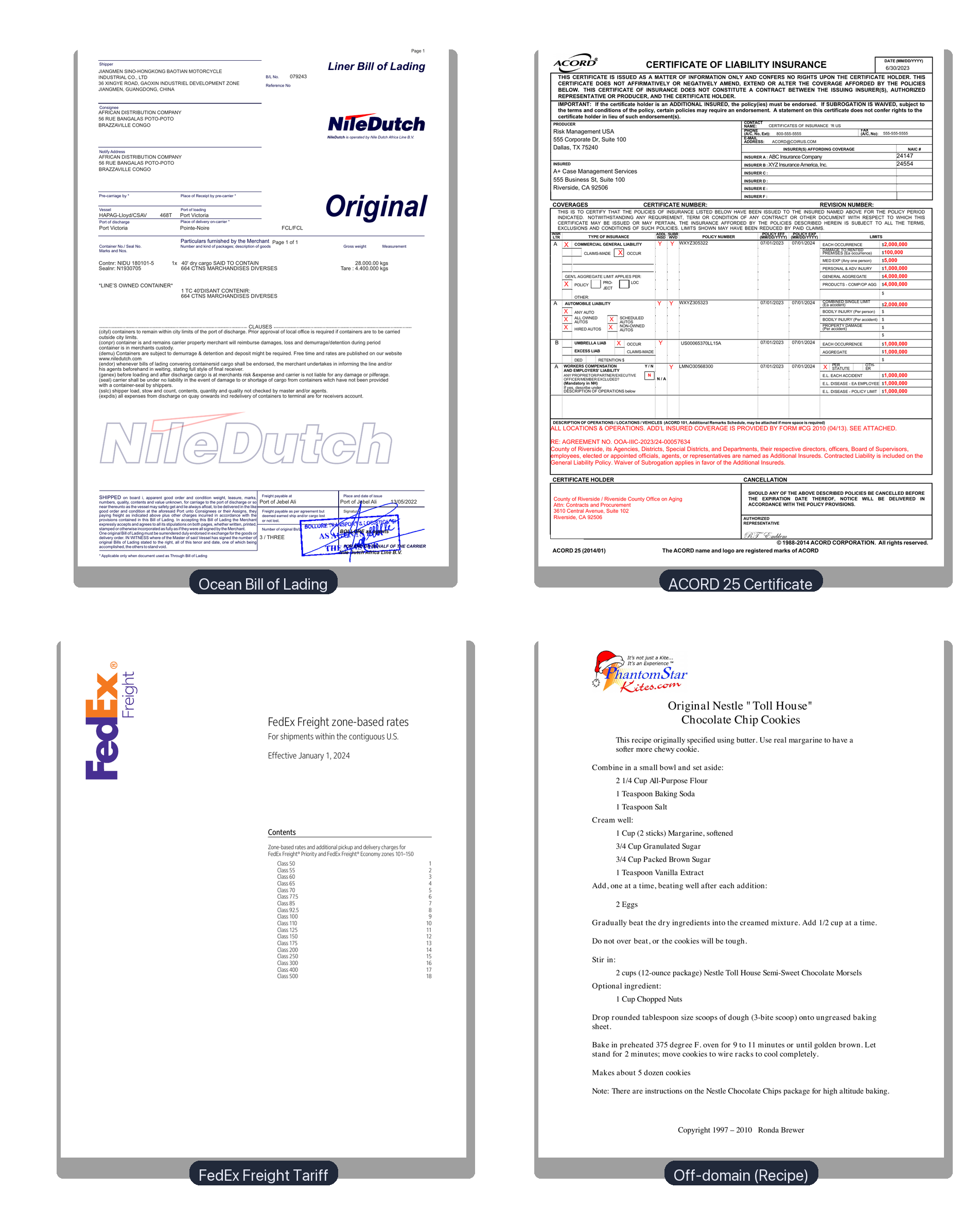
The four inbound documents we ran through the pipeline. The first two map cleanly to typed extractors. The third is the public FedEx Freight zone-based rate tariff. A real on-domain freight document with no fixed schema. The fourth is a cookie recipe that found its way into the queue by accident. Both end up handled, in different ways.
The five primitives
bem workflows are made of typed function nodes. Each one has a single contract, a single output shape, and composes with the others.
- Extract. Schema-bound JSON. You give it a JSON schema, it returns the document content filled into that schema with per-field confidence scores.
- Parse. Agentic file-system. For documents that arrive as complete bundles or off-template scans, you hand bem a file system and it decides what to open, in what order, and what to return.
- Enrich. Semantic lookup against a Collection. Pull external context (carrier registry, customer master, SKU table) into the extracted JSON in one step.
- Classify. Routing. Inspect an inbound document, choose one of N downstream branches, fall back gracefully when it doesn't fit.
- Send. Delivery. Push the structured output to a webhook, an S3 prefix, or a folder in Drive.
A workflow is a graph of these nodes. You can build one in the editor, or define it in code via the V3 API. Same shape either way.
1. Extract: an ACORD 25 in one call
The cleanest place to start is a certificate of insurance. The ACORD 25 form is standardized, every carrier ships one, and the data lives in a fixed grid of boxes.
Here is a real filled COI we ran through freight-coi-extract, a function bound to a four-section JSON schema (insured, insurers, policies, certificate holder).
Input. A two-page ACORD 25 issued by Risk Management USA for a Riverside County contract.
Call.
1curl -X POST "https://api.bem.ai/v3/functions/freight-coi-extract/call?wait=true" \2 -H "x-api-key: $BEM_API_KEY" \3 -H "Content-Type: application/json" \4 -d @- <<'JSON'5{6 "callReferenceID": "demo-coi-001",7 "input": { "singleFile": { "inputType": "pdf", "inputContent": "<base64>" } }8}9JSON
Output. 22 seconds end to end. Average confidence across all fields: 0.99.
1{2 "insured": {3 "name": "A+ Case Management Services",4 "address": "555 Business St, Suite 100 Riverside, CA 92506"5 },6 "insurers": [7 { "letter": "A", "name": "ABC Insurance Company", "naic": "24147" },8 { "letter": "B", "name": "XYZ Insurance America, Inc.", "naic": "24554" }9 ],10 "policies": [11 {12 "type": "general_liability",13 "policyNumber": "WXYZ305322",14 "insurerLetter": "A",15 "effectiveDate": "07/01/2023",16 "expirationDate": "07/01/2024",17 "additionalInsured": true,18 "waiverOfSubrogation": true19 },20 {21 "type": "auto_liability",22 "policyNumber": "WXYZ305323",23 "insurerLetter": "A",24 "effectiveDate": "07/01/2023",25 "expirationDate": "07/01/2024",26 "additionalInsured": true,27 "waiverOfSubrogation": true28 },29 {30 "type": "umbrella",31 "policyNumber": "US00065370LL15A",32 "insurerLetter": "B",33 "effectiveDate": "07/01/2023",34 "expirationDate": "07/01/2024",35 "additionalInsured": true,36 "waiverOfSubrogation": false37 },38 {39 "type": "workers_comp",40 "policyNumber": "LMNO30568300",41 "insurerLetter": "A",42 "effectiveDate": "07/01/2023",43 "expirationDate": "07/01/2024",44 "additionalInsured": true,45 "waiverOfSubrogation": false46 }47 ],48 "certificateHolder": {49 "name": "County of Riverside / Riverside County Office on Aging",50 "address": "3610 Central Avenue, Suite 102 Riverside, CA 92506"51 }52}
Four policies. Four expirations. Two insurers cross-referenced by letter code. Subrogation waivers per policy. The booleans were inferred from the descriptions field. Every value comes back with a confidence score on a sibling object that we trimmed for readability.
You could write a Python parser for this. We have. It's a thousand lines and it breaks every time an agency uses a slightly different template. Extract is a single function call that handles every ACORD 25 variant we have seen, and the schema is the contract.
2. Enrich: a bill of lading meets your carrier registry
Extract gives you the document. Enrich gives you the document plus the rest of the world.
A bill of lading shows up with a carrier name, sometimes a SCAC code, sometimes a DOT number. What it does not include is the rest of your carrier intelligence: insurance status, lane history, on-time score, payment terms. That lives in your own system.
bem Collections solve this. You write a Collection once (a list of carrier records with metadata), and any Extract output can run through an Enrich node that does a semantic match against it.
Our freight_carriers Collection has seventeen carriers seeded for this demo: domestic LTL, international ocean carriers, and global forwarders.
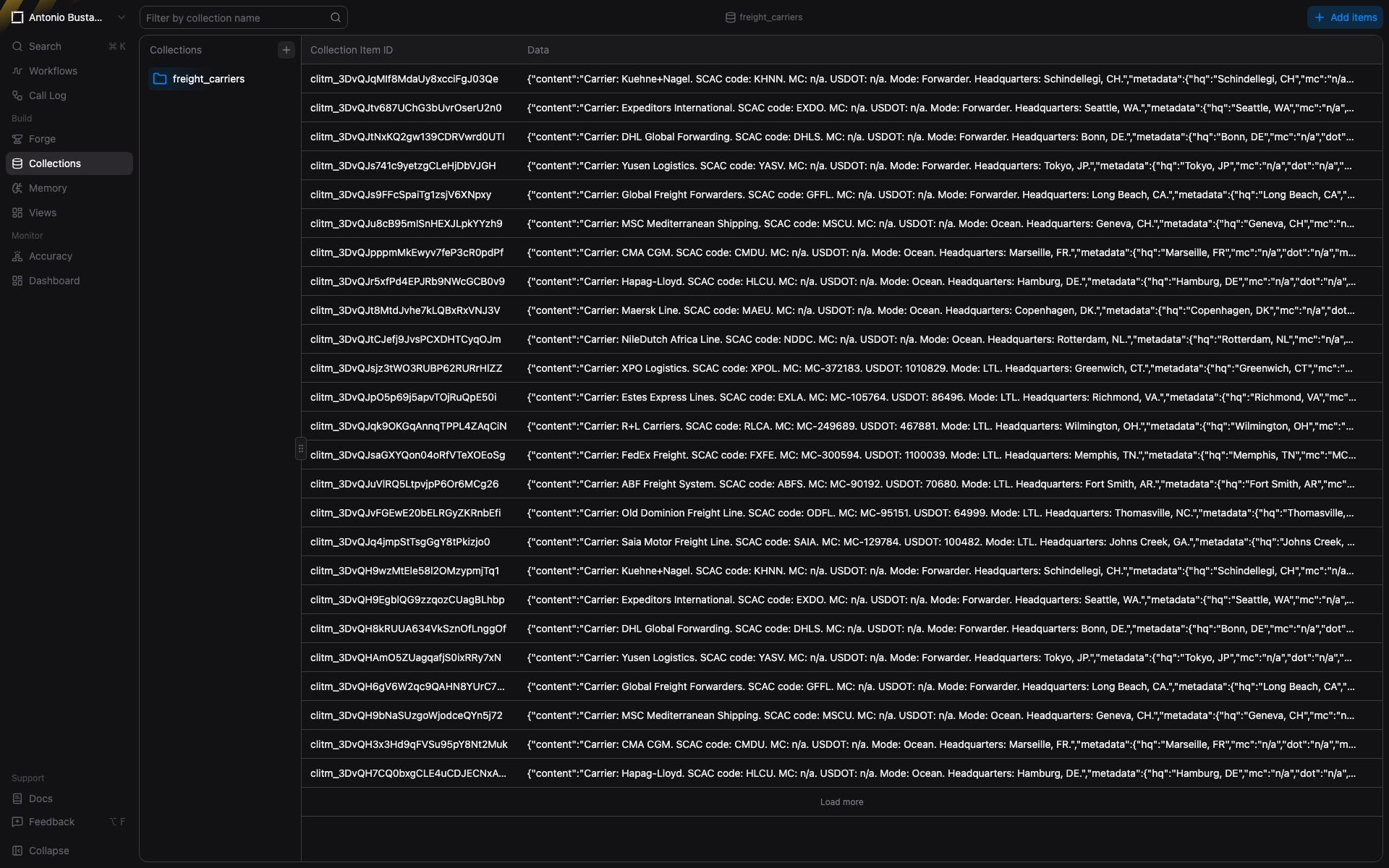
The `freight_carriers` Collection. Seventeen real carriers and forwarders with SCAC, MC, DOT, mode, and headquarters. Items are denormalized into a single content string per row so semantic search hits work over any field.
The freight-carrier-enrich-bol function is configured to pull carrier.name from the extracted BOL, semantic-search it against freight_carriers, and stuff the top match back into the output at carrierProfile.
Input. A real ocean bill of lading from NileDutch Africa Line, Jiangmen to Brazzaville, 28 metric tons of motorcycles, container NIDU 180101-5.
Output. The full extracted BOL with the carrier profile attached inline.
1{2 "bolNumber": "079243",3 "shipDate": "2022-05-13",4 "carrier": { "name": "NileDutch", "mode": "ocean" },5 "shipper": {6 "name": "JIANGMEN SINO-HONGKONG BAOTIAN MOTORCYCLE INDUSTRIAL CO., LTD",7 "address": "36 XINGYE ROAD, GAOXIN INDUSTRIEL DEVELOPMENT ZONE JIANGMEN, GUANGDONG, CHINA"8 },9 "consignee": {10 "name": "AFRICAN DISTRIBUTION COMPANY",11 "address": "56 RUE BANGALAS POTO-POTO BRAZZAVILLE CONGO"12 },13 "portOfLoading": "Port Victoria",14 "portOfDischarge": "Port Victoria",15 "containerNumber": "NIDU 180101-5",16 "sealNumber": "N1930705",17 "items": [18 {19 "quantity": 664,20 "weightKg": 28000,21 "weightLbs": 61729.43,22 "description": "MARCHANDISES DIVERSES"23 }24 ],25 "totalWeight": "28.000.00 kgs",26 "freightTerms": "prepaid",27 "carrierProfile": [{28 "data": {29 "content": "Carrier: NileDutch Africa Line. SCAC code: NDDC. Mode: Ocean. Headquarters: Rotterdam, NL.",30 "metadata": {31 "name": "NileDutch Africa Line",32 "scac": "NDDC",33 "mode": "Ocean",34 "hq": "Rotterdam, NL"35 }36 }37 }]38}
The BOL itself did not carry an SCAC. Enrich matched the carrier semantically off the name field and pulled the full registry record, including the SCAC code. Your downstream system now has a normalized carrier reference, no join logic required.
If you want exact-match behavior, switch the function from searchMode: "hybrid" to "exact". If you want richer recall, switch to "semantic". The contract stays the same: you tell it what field to source from, what Collection to hit, where to put the result.
3. Parse: the safety net for everything else
Extract assumes you know what you are getting. Parse handles the case where you don't.
This is the part that always gets short-changed when teams build their own pipeline. You spec a vendor template for each known doc type, you ship it, and then a freight tariff lands in the queue, or a vendor sends a PDF in a layout you haven't seen, or a file gets uploaded to the wrong folder. The pipeline either crashes or silently drops the document.
Parse is the production fail-safe. It exposes a file-system view of the input. An agent decides what to read, in what order, and shapes its own output. In the magnum-opus workflow Parse is wired as the error fallback for Classify: if a document does not match one of the typed branches, it goes to Parse and comes back as structured-but-untyped JSON.
We threw two stress cases at it.
Case A: a real freight document that doesn't fit our schemas
FedEx publishes its Freight Zone-Based Rates as a public 20-page tariff PDF, effective January 1, 2024, listing per-class per-zone rates for every shipment within the contiguous U.S. Real, on-domain, freight. But it isn't a BOL. It isn't an invoice. It isn't a COI. None of our typed extractors are right for it.
Classifier sent it straight to unknown_or_agentic. Parse handled the 20 pages and returned structured sections:
1{2 "sections": [3 {4 "page": 1,5 "type": "title",6 "label": "Document Title",7 "content": "FedEx Freight zone-based rates"8 },9 {10 "page": 1,11 "type": "subtitle",12 "label": "Scope and Effective Date",13 "content": "For shipments within the contiguous U.S. / Effective January 1, 2024"14 },15 {16 "page": 1,17 "type": "table",18 "label": "Table of Contents",19 "content": "Class 50 1\nClass 55 2\nClass 60 3\nClass 65 4\nClass 70 5\nClass 77.5 6\nClass 85 7\nClass 92.5 8\nClass 100 9\nClass 110 10\nClass 125 11\nClass 150 12\nClass 175 13\nClass 200 14\nClass 250 15\nClass 300 16\nClass 400 17\nClass 500 18"20 },21 {22 "page": 2,23 "type": "title",24 "label": "Main Title",25 "content": "How to calculate FedEx Freight rates"26 },27 {28 "page": 2,29 "type": "list",30 "label": "Step 1: Find the zone",31 "content": "1. Find the zone for your shipment. Create a zone locator (inbound or outbound) to find the FedEx Freight zone for your ZIP code or postal code: contiguous U.S., from U.S. to Canada, or from Canada to U.S."32 }33 ]34}
That is a tariff that nobody wrote a schema for, returned as something your downstream system can read. The rate matrices on pages 3 through 20 came back as additional table sections, one per freight class. You can build the typed extractor later. Today, the document landed.
Case B: a totally off-domain document
A cookie recipe ended up in the queue. Someone uploaded the wrong file to the wrong folder. In a hand-rolled pipeline this is a 500 error or a silent drop. With Parse as the fallback, the workflow handled it like any other off-template input:
1{2 "sections": [3 {4 "page": 1,5 "type": "title",6 "label": "Recipe Title",7 "content": "Original Nestle \"Toll House\" / Chocolate Chip Cookies"8 },9 {10 "page": 1,11 "type": "list",12 "label": "Dry Ingredients",13 "content": "2 1/4 Cup All-Purpose Flour\n1 Teaspoon Baking Soda\n1 Teaspoon Salt"14 },15 {16 "page": 1,17 "type": "list",18 "label": "Stir-in Ingredients",19 "content": "2 cups (12-ounce package) Nestle Toll House Semi-Sweet Chocolate Morsels"20 }21 ]22}
The pipeline did not break. The document is now searchable, escalation-ready, and visible in the call log next to every BOL and COI that came in that day. Whoever uploaded the wrong file gets a polite redirect instead of a corrupted run.
The pattern matters more than the recipe. Parse is what makes a typed pipeline production-safe.
4. Classify: the orchestrator
The document types in a freight pipeline don't all need the same handler. A BOL needs the BOL schema. A COI needs the ACORD 25 schema. A commercial invoice needs an invoice schema. Anything else needs the agent.
Classify is the single node that routes inbound documents to the right one.
Our freight-doc-classifier is configured with four destinations:
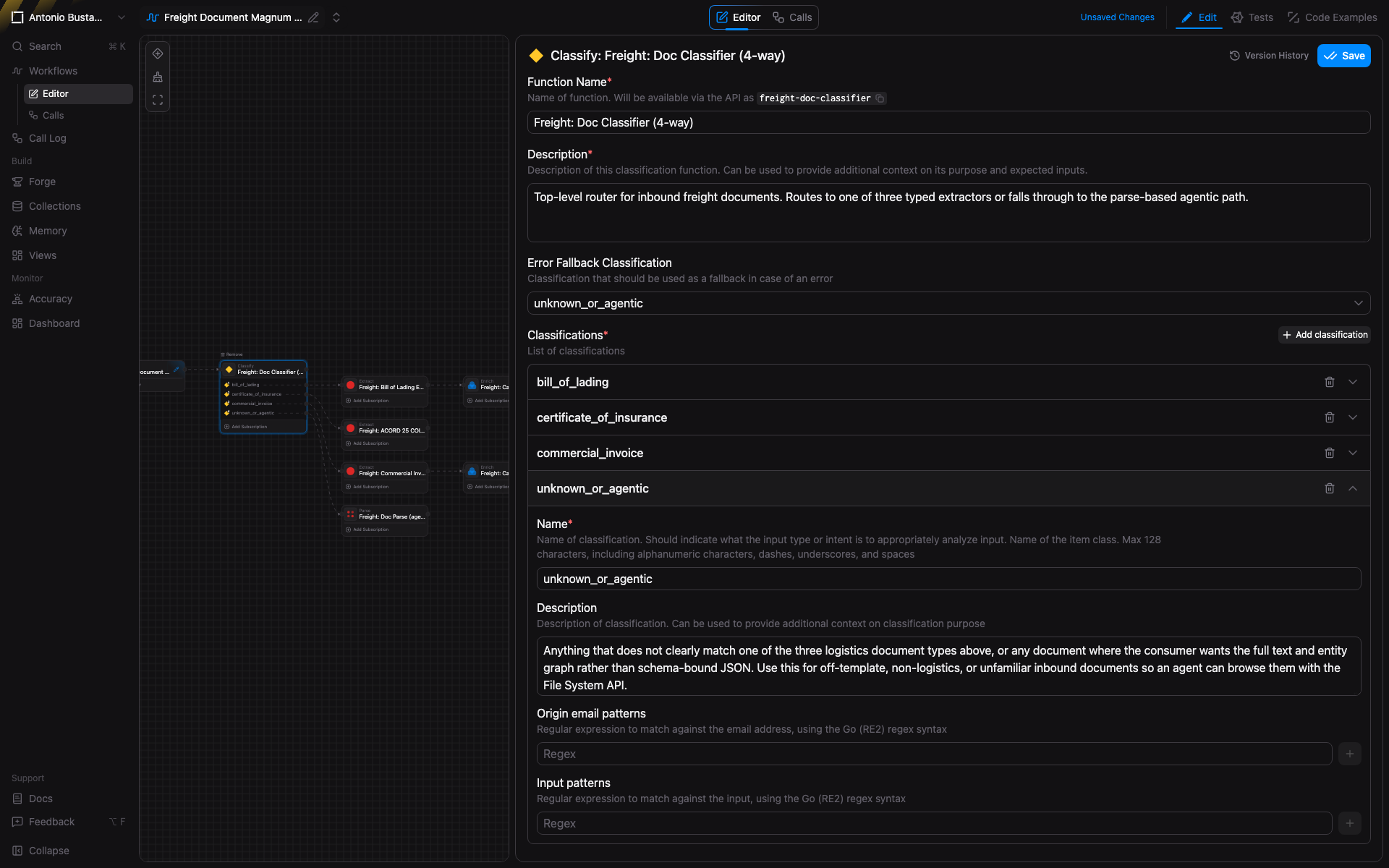
The Classify function in the workflow editor. Four destinations: bill_of_lading, certificate_of_insurance, commercial_invoice, unknown_or_agentic. The fourth is marked as error fallback so any document that does not fit the typed schemas lands in Parse rather than failing.
Each destination has a positive description (what signals the classifier should look for) and a named function it routes to. The error-fallback flag on unknown_or_agentic is the production fail-safe — every typed router needs one and most teams forget to wire it. Without it, the long tail of the inbound stream silently drops.
5. Send: where the output goes
The structured JSON has to land somewhere. Send is the terminal node that delivers it.
1{2 "name": "freight-deliver-bol",3 "type": "send",4 "config": {5 "destination": {6 "type": "webhook",7 "url": "https://your-app.example.com/inbound/bol",8 "method": "POST"9 }10 }11}
Send accepts webhooks, S3 prefixes, and Google Drive folders. Same workflow, three different delivery shapes. You can run multiple Send nodes per workflow if a single document needs to go to more than one system, or branch the Send target inside Classify if BOLs go to your TMS but COIs go to your compliance bucket.
For warehouse-shaped workloads, point Send at an S3 prefix that your Airflow or Snowpipe already watches. For application-shaped workloads, point it at a webhook. For ops-shaped workloads, point it at a Drive folder where the team already lives.
The magnum opus: one workflow, every document type
Here is what happens when you compose all five primitives into a single workflow.
freight-document-magnum-opus accepts any document a freight ops team might receive. A Classify node at the head routes to one of three Extract branches based on document type, or to the Parse agent on fallback. The BOL branch and the commercial invoice branch each feed into a carrier Enrich step. Every branch terminates at a Send node that delivers the structured output to a downstream system.
We ran four real documents through it while writing this post:
- BOL (NileDutch ocean BOL, 1991 KB). Classified as
bill_of_lading. Extracted, then enriched against the carrier Collection. NileDutch matched cleanly to its registry entry. 26 seconds end to end. - COI (Riverside County ACORD 25, 418 KB). Classified as
certificate_of_insurance. Four policies returned at 0.99 average confidence. 34 seconds end to end. - FedEx Freight Zone-Based Rates (20-page public tariff, 244 KB). Classified as
unknown_or_agentic. Parse returned 20 pages of structured rate sections. 35 seconds end to end. - Cookie recipe (uploaded to the wrong folder, 52 KB). Classified as
unknown_or_agentic. Parse returned structured recipe sections. 16 seconds end to end.
The full call log lives in the workflow's Calls view:
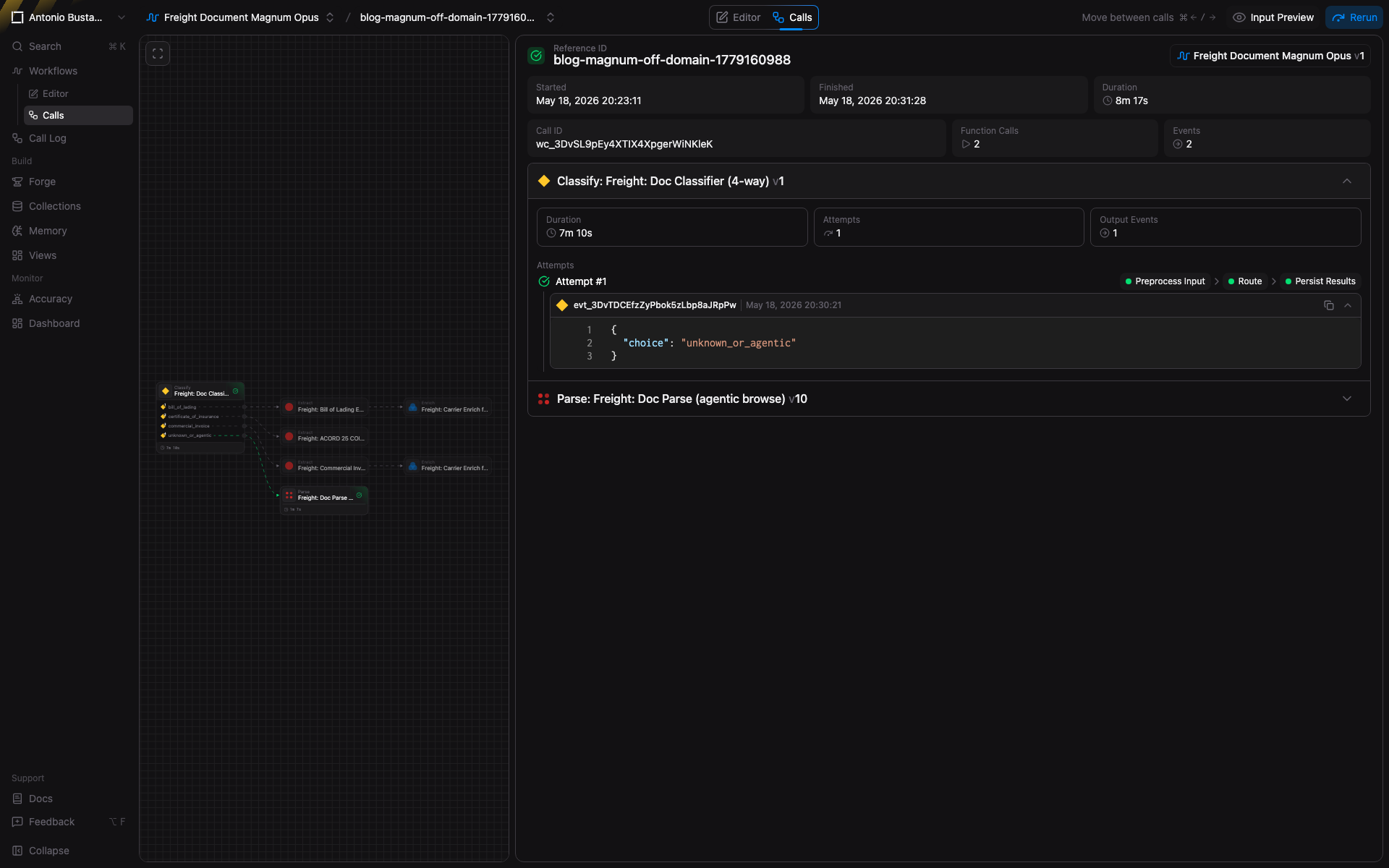
Every call is independently traceable. Each row is one document, with its Classify result, branch path, and terminal output. Drill in to see the JSON at every stage and the confidence scores per field.
Two typed extracts with clean Enrich. Two agentic Parse fallbacks for documents that did not fit any schema. No document was dropped. No branch failed. The whole pipeline took under a minute of compute for four real PDFs.
Why this composes
The point of breaking the pipeline into typed primitives is not the diagram. It is what happens the day a new document type arrives.
A new document type is a new Classify branch and a new Extract function. The other branches do not change. Adding a new carrier is a new row in the Collection. The Enrich function does not change. Adding a new delivery destination is a new Send config. The Extract functions do not change.
Every primitive is independently versioned and reusable across workflows. The COI extractor in this post is the same function we use in our compliance demo. The carrier Collection is the same one a TMS-integration workflow uses for lane pricing. The same Classify node, with a different destination set, becomes the front door of a totally different pipeline.
This is the part that gets harder to do with a vendor-template-per-document-type approach: every new document type is a net-new piece of infrastructure. With the bem primitives, every new document type is a new line in an existing graph.
Try it
The whole demo above is reproducible in your own account. The four documents are public. The functions, Collection, and workflow above can be created via the V3 API in under fifty lines of Python.
If you process freight documents and want to talk through what your version of this workflow looks like, reach out: antonio@bem.ai.
If you'd rather just try the platform first, app.bem.ai gives you the same primitives with a one-click upload.
One workflow. Every freight document. That's the last pipeline you'll build.
Written by
Antonio Bustamante
May 20, 2026


Ready to see it in action?
Talk to our team to walk through how Bem can work inside your stack.
Talk to the team