
The Two Paths of Document Intelligence
RAG and agent-native document access are diverging. This guide covers both, then demonstrates each on a 456-page NFL contract with working code.

Every production team working with unstructured data faces the same fork in the road. On one side: the retrieval-augmented generation (RAG) pipeline that became the default approach in 2023. On the other: a newer pattern where AI agents access documents directly, navigating them the way a human would. Both work. They solve different problems. And the teams shipping the most resilient systems are starting to use both.
This guide covers the architecture, tradeoffs, and production considerations of each approach. Then it demonstrates both on a real document, the NFL's 456-page Collective Bargaining Agreement, with working code you can run today.
How We Got Here
Document intelligence has gone through three distinct waves.
The first wave was template-based extraction. OCR engines with hand-written rules for known layouts. Accurate on the templates they were built for, brittle on everything else. If a vendor changed their invoice format, the pipeline broke.
The second wave was ML classification. Models trained on labeled datasets to classify document types and extract named fields. Better at handling variation, but still bounded by training data. Adding a new document type meant weeks of labeling and fine-tuning.
The third wave, the one we're in now, was enabled by large language models. LLMs can read documents with no task-specific training. They understand context, handle variation, and can extract data from formats they've never seen before. This unlocked two fundamentally different architectures for making unstructured data usable at scale.
Approach 1: Compressed Semantics (RAG)
The RAG pipeline compresses a document's meaning ahead of time. You chunk the text, generate vector embeddings for each chunk, store them in a database, and retrieve the most relevant pieces at query time. The semantics are pre-computed and frozen at ingest.
The architecture looks like this:
- Ingest: Split documents into overlapping chunks (typically 256–1024 tokens)
- Embed: Generate vector representations using an embedding model
- Store: Write vectors to a database (Pinecone, Weaviate, pgvector, etc.)
- Retrieve: At query time, embed the question and find nearest-neighbor chunks
- Generate: Feed the retrieved chunks to an LLM as context for the answer
This architecture works well when:
- You have known question patterns, and the types of queries are predictable
- Latency matters: pre-computed embeddings make retrieval fast
- Volume is high: the same corpus is queried thousands of times
- The domain is narrow: a well-tuned chunking strategy captures the information you need
RAG has earned its place in production. The challenge is what happens at the boundaries. Chunking is lossy by nature. A table header on page 1 that defines the unit of measurement for numbers on page 47 gets separated during chunking. Footnotes that modify the meaning of a clause three pages earlier are embedded in a different vector. Cross-references like "as defined in Article 12, Section 6(c)" point to context that may not be retrieved together.
For structured extraction (invoices, rate confirmations, forms), this rarely matters. For interpretive reasoning over long documents (contracts, regulatory filings, compliance audits), it can be a liability.
Approach 2: Just-in-Time Semantics (Agent-Native)
The agent-native approach skips chunking entirely. Instead, the document is parsed into a navigable structure (sections, entities, relationships) and made available through an API that agents can call on demand. The semantics aren't compressed ahead of time. They're resolved in the moment, by the agent, as it reasons through a task.
The access pattern mirrors how coding agents like Claude Code or Cursor navigate a codebase. They don't embed every file into a vector database. They ls the directory, grep for a symbol, cat the relevant file, and read what they need. The same pattern works for documents: list what's available, search for relevant sections, read the content, follow cross-references.
This architecture works well when:
- Questions are open-ended, and you can't predict what the user will ask
- Cross-section reasoning is required: the answer spans multiple parts of the document
- Context integrity matters: losing a footnote or cross-reference changes the meaning
- Documents are large and complex: contracts, regulatory filings, technical manuals
The tradeoff is token cost. An agent exploring a 456-page contract will consume more tokens per query than a vector lookup. For high-volume, repetitive queries on short documents, RAG is more cost-efficient. For complex reasoning over long documents, the additional token cost buys you something RAG can't provide: the full picture.
Side by Side
| RAG (Compressed Semantics) | Agent-Native (Just-in-Time) | |
|---|---|---|
| Pre-processing | Chunk → embed → store in vector DB | Parse into navigable structure (sections, entities) |
| At query time | Vector similarity search → top-K chunks → LLM | Agent traverses document via API (ls, grep, cat, find) |
| Context window | Fixed chunk size; cross-chunk context is lost | Full document available; agent reads what it needs |
| Cross-references | Separated during chunking; may not co-retrieve | Preserved in document structure; agent can follow them |
| Best for | High-volume structured extraction, known question patterns | Open-ended reasoning, compliance, multi-section analysis |
| Latency | Fast and predictable (pre-computed embeddings) | Variable (depends on how much the agent reads) |
| Cost per query | Low (embedding lookup + small LLM call) | Higher (token-proportional to traversal depth) |
| Infrastructure | Requires vector DB, embedding pipeline, chunk tuning | Requires document parsing layer and agent runtime |
The Convergence
These two approaches aren't competing. They're complementary. The same document can be structurally extracted and made available for agent exploration. In practice, the most robust systems do exactly that.
Consider a contract management platform. Structured extraction pulls the parties, effective dates, termination clauses, and renewal terms into the system of record. That feeds dashboards, alerts, and automated workflows. Meanwhile, the parsed document is available for an agent that can answer ad-hoc questions: "Does this contract have a non-compete clause?", "What happens if the vendor misses the SLA for three consecutive months?", "Compare the indemnification language in our two largest supplier contracts."
Different access patterns, same document, same API. The rest of this guide demonstrates both.
The Test Document
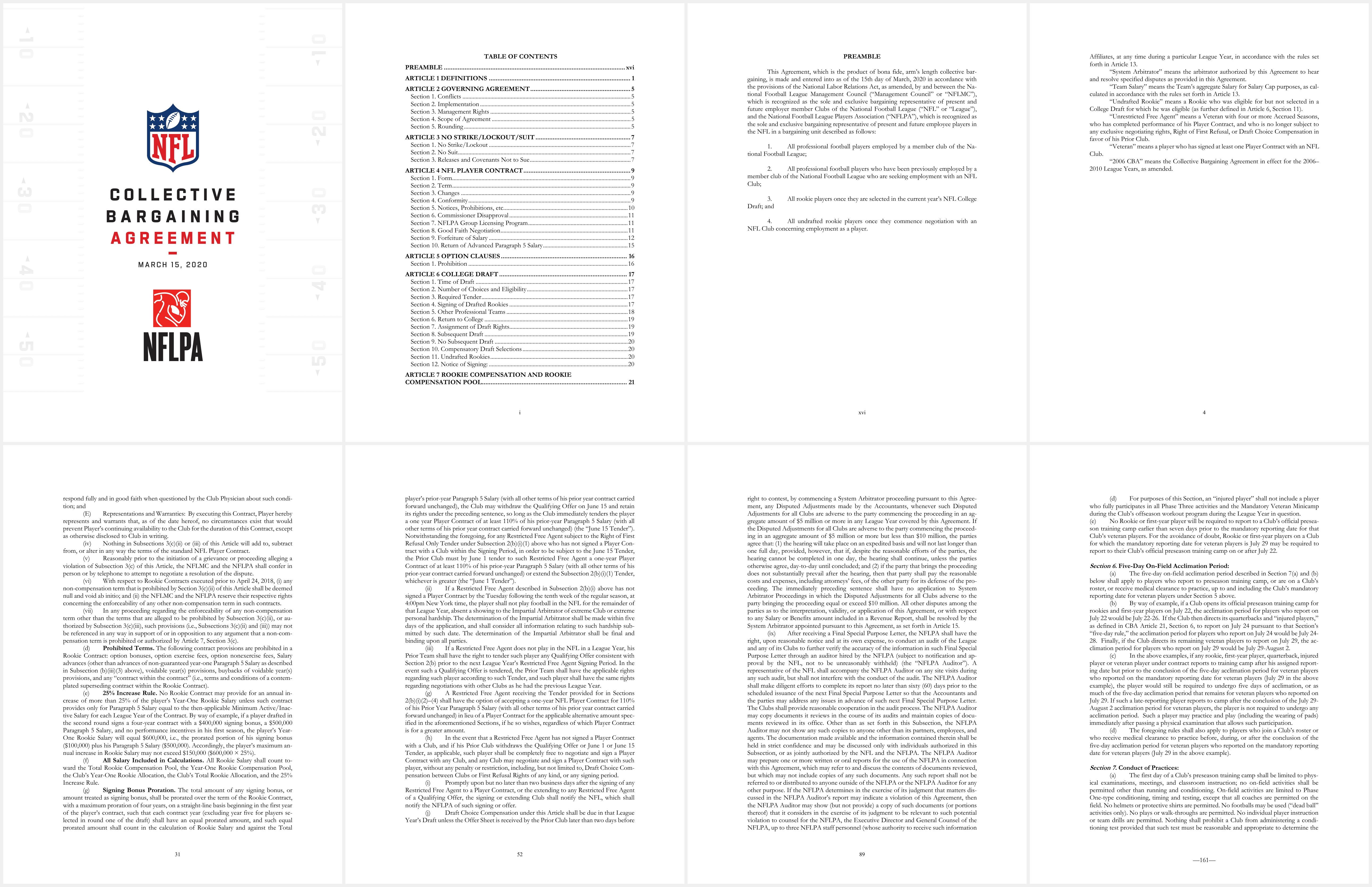
We're using the NFL-NFLPA Collective Bargaining Agreement, a 456-page contract that governs player compensation, salary caps, free agency, the college draft, drug testing, disciplinary procedures, and more. It's publicly available from the NFLPA website. It represents exactly the kind of document that stress-tests both approaches: long, dense, heavily cross-referenced, and full of defined terms that modify meaning across sections.
Structured Extraction with Extract
Extract is for when you know exactly what data you need from a document. You define a schema, send the document, and get back structured JSON. This is the RAG-adjacent approach: deterministic, schema-enforced, designed for automation.
Define a schema
Create an extraction function with the fields you care about. Here we're pulling key contract terms: the parties, dates, salary cap structure, and major provisions.
1curl -X POST https://api.bem.ai/v3/functions \2 -H "x-api-key: $BEM_API_KEY" \3 -H "Content-Type: application/json" \4 -d '{5 "functionName": "contract-terms",6 "type": "extract",7 "displayName": "Contract Terms Extractor",8 "outputSchemaName": "ContractTerms",9 "outputSchema": {10 "type": "object",11 "required": ["parties", "effectiveDate", "termLength"],12 "properties": {13 "parties": {14 "type": "array",15 "description": "Named parties to the agreement",16 "items": {17 "type": "object",18 "properties": {19 "name": { "type": "string" },20 "role": { "type": "string" }21 }22 }23 },24 "effectiveDate": { "type": "string" },25 "expirationDate": { "type": "string" },26 "termLength": { "type": "string" },27 "keyProvisions": {28 "type": "array",29 "items": {30 "type": "object",31 "properties": {32 "title": { "type": "string" },33 "summary": { "type": "string" }34 }35 }36 },37 "disputeResolution": { "type": "string" }38 }39 }40 }'
Send the document
Wrap the function in a workflow and submit the PDF. For a 456-page document, use async mode.
1# Create the workflow2curl -X POST https://api.bem.ai/v3/workflows \3 -H "x-api-key: $BEM_API_KEY" \4 -H "Content-Type: application/json" \5 -d '{6 "name": "contract-analysis",7 "mainNodeName": "contract-terms",8 "nodes": [{9 "name": "contract-terms",10 "function": { "name": "contract-terms" }11 }]12 }'1314# Submit the 456-page CBA15curl -X POST https://api.bem.ai/v3/workflows/contract-analysis/call \16 -H "x-api-key: $BEM_API_KEY" \17 -F "wait=false" \18 -F "callReferenceID=nfl-cba-001" \19 -F "file=@nfl-cba-2020.pdf"
The result
This is the actual output from running the NFL CBA through Extract. 456 pages processed in 95 seconds:
1{2 "parties": [3 {4 "name": "National Football League Management Council",5 "role": "Management Council"6 },7 {8 "name": "National Football League Players Association",9 "role": "Union"10 }11 ],12 "effectiveDate": "2020-03-15",13 "termLength": "11 years",14 "salaryCap": {15 "amount": "Calculated based on AR, Projected AR, and Player Cost Amount"16 },17 "keyProvisions": [18 {19 "title": "No Strike/Lockout/Suit",20 "summary": "Neither party will engage in strikes or lockouts"21 },22 {23 "title": "College Draft",24 "summary": "Rules for annual and supplemental drafts, including eligibility"25 },26 {27 "title": "Veteran Free Agency",28 "summary": "Rules for unrestricted and restricted free agents"29 },30 {31 "title": "Franchise and Transition Players",32 "summary": "Rules for designating franchise/transition players"33 },34 {35 "title": "Anti-Collusion",36 "summary": "Prohibited conduct, enforcement provisions, burden of proof"37 }38 ],39 "disputeResolution": "System Arbitrator and Impartial Arbitrator with binding authority"40}
Every field maps to the schema you defined. If a field can't be determined with high confidence, it's flagged, not hallucinated.
The same flow in Python
1from bem import Bem23client = Bem() # reads BEM_API_KEY from environment45call = client.workflows.call(6 workflow_name="contract-analysis",7 file_path="nfl-cba-2020.pdf",8 wait=True9)1011terms = call.outputs[0].transformed_content12print(f"Parties: {terms['parties'][0]['name']} & {terms['parties'][1]['name']}")13print(f"Term: {terms['effectiveDate']}, {terms['termLength']}")1415for p in terms['keyProvisions']:16 print(f" {p['title']}: {p['summary']}")
Agent-Native Access with Parse
Parse takes the opposite approach. Instead of defining what you want out of the document, you give Bem the document and it builds a navigable knowledge layer: sections with labeled content, named entities, and relationships. Your agents explore this layer through file-system-style operations.
Parse the document
1# Create a parse function2curl -X POST https://api.bem.ai/v3/functions \3 -H "x-api-key: $BEM_API_KEY" \4 -H "Content-Type: application/json" \5 -d '{6 "functionName": "document-parser",7 "type": "parse",8 "displayName": "Document Parser"9 }'1011# Create workflow and send the CBA12curl -X POST https://api.bem.ai/v3/workflows \13 -H "x-api-key: $BEM_API_KEY" \14 -H "Content-Type: application/json" \15 -d '{16 "name": "doc-parser",17 "mainNodeName": "document-parser",18 "nodes": [{ "name": "document-parser", "function": { "name": "document-parser" } }]19 }'2021curl -X POST https://api.bem.ai/v3/workflows/doc-parser/call \22 -H "x-api-key: $BEM_API_KEY" \23 -F "wait=false" \24 -F "callReferenceID=nfl-cba-parse" \25 -F "file=@nfl-cba-2020.pdf"
The NFL CBA parses into 574 sections and 29 named entities. Once parsed, the document is accessible through the File System API.
The File System API
All file system operations go through a single endpoint: POST /v3/fs. The op field determines the operation. This is the same access pattern that coding agents use to navigate codebases, and it's immediately familiar to any LLM agent.
ls: List parsed documents
See all documents in your environment with metadata:
1curl -X POST https://api.bem.ai/v3/fs \2 -H "x-api-key: $BEM_API_KEY" \3 -H "Content-Type: application/json" \4 -d '{ "callID": "YOUR_CALL_ID", "op": "ls" }'
1{2 "op": "ls",3 "data": [4 {5 "referenceID": "nfl-cba-parse-demo",6 "functionName": "document-parser",7 "parsedAt": "2026-04-30T23:05:23Z",8 "pageCount": 116,9 "sectionCount": 574,10 "entityCount": 29,11 "previewEntities": [12 "National Football League",13 "National Football League Players Association",14 "NFL Collective Bargaining Agreement",15 "NFL Player Contract",16 "NFLPA Group Licensing Program",17 "College Draft"18 ]19 }20 ]21}
stat: Document metadata
Get detailed metadata for a specific document:
1curl -X POST https://api.bem.ai/v3/fs \2 -H "x-api-key: $BEM_API_KEY" \3 -H "Content-Type: application/json" \4 -d '{ "callID": "YOUR_CALL_ID", "op": "stat", "path": "nfl-cba-parse-demo" }'
1{2 "op": "stat",3 "data": {4 "kind": "parsed_document",5 "path": "nfl-cba-parse-demo",6 "referenceID": "nfl-cba-parse-demo",7 "functionName": "document-parser",8 "pageCount": 116,9 "sectionCount": 574,10 "entityCount": 29,11 "parsedAt": "2026-04-30T23:05:23Z"12 }13}
head: First sections of a document
Read the opening sections to understand document structure:
1curl -X POST https://api.bem.ai/v3/fs \2 -H "x-api-key: $BEM_API_KEY" \3 -H "Content-Type: application/json" \4 -d '{ "callID": "YOUR_CALL_ID", "op": "head", "path": "nfl-cba-parse-demo" }'
1{2 "op": "head",3 "data": {4 "sections": [5 { "content": "NFL", "label": "Organization Logo", "page": 1, "type": "header" },6 { "content": "COLLECTIVE BARGAINING AGREEMENT", "label": "Document Title", "page": 1, "type": "title" },7 { "content": "MARCH 15, 2020", "label": "Effective Date", "page": 1, "type": "metadata" },8 { "content": "TABLE OF CONTENTS", "label": "Document Title", "page": 2, "type": "title" },9 {10 "content": "PREAMBLE ... xvi\nARTICLE 1 DEFINITIONS ... 1\nARTICLE 2 GOVERNING AGREEMENT ... 5\nARTICLE 3 NO STRIKE/LOCKOUT/SUIT ... 7\nARTICLE 4 NFL PLAYER CONTRACT ... 9\nARTICLE 5 OPTION CLAUSES ... 16\nARTICLE 6 COLLEGE DRAFT ... 17\nARTICLE 7 ROOKIE COMPENSATION ... 21",11 "label": "Table of Contents Entries",12 "page": 2,13 "type": "list"14 }15 ]16 }17}
grep: Search across sections
Search the entire document for a term or phrase. Results include the page, section label, and a snippet with context:
1curl -X POST https://api.bem.ai/v3/fs \2 -H "x-api-key: $BEM_API_KEY" \3 -H "Content-Type: application/json" \4 -d '{ "callID": "YOUR_CALL_ID", "op": "grep", "pattern": "salary cap" }'
1{2 "op": "grep",3 "data": [4 {5 "referenceID": "nfl-cba-parse-demo",6 "scope": "section",7 "page": 4,8 "sectionLabel": "ARTICLE 13 SALARY CAP ACCOUNTING RULES",9 "snippet": "ARTICLE 13 SALARY CAP ACCOUNTING RULES ... 106\nSection 1. Calculation of the Salary Cap ..."10 },11 {12 "referenceID": "nfl-cba-parse-demo",13 "scope": "section",14 "page": 4,15 "sectionLabel": "ARTICLE 14 ENFORCEMENT OF THE SALARY CAP AND ROOKIE COMPENSATION POOL",16 "snippet": "ARTICLE 14 ENFORCEMENT OF THE SALARY CAP AND ROOKIE COMPENSATION POOL ... 127\nSection 1. Undisclosed Terms ..."17 },18 {19 "referenceID": "nfl-cba-parse-demo",20 "scope": "section",21 "page": 19,22 "sectionLabel": "Definitions",23 "snippet": "\"Free Agent\" means a player who is not under contract and is free to negotiate and sign a Player Contract with any NFL Club ..."24 }25 ]26}
An agent can use grep to find every mention of a concept across all 574 sections, then drill into the specific pages that matter. No chunking strategy needed. The search is over the full parsed document.
find: Discover named entities
List the canonical entities Bem has identified in the document: organizations, committees, agreements, people, and concepts.
1curl -X POST https://api.bem.ai/v3/fs \2 -H "x-api-key: $BEM_API_KEY" \3 -H "Content-Type: application/json" \4 -d '{ "callID": "YOUR_CALL_ID", "op": "find" }'
1{2 "op": "find",3 "data": [4 {5 "entityID": "ent_...",6 "canonical": "NFL Head, Neck and Spine Committee",7 "type": "committee",8 "description": "A committee that reviews medical reports regarding head, neck, and spine health",9 "mentionCount": 4,10 "surfaceForms": ["NFL Head, Neck and Spine Committee", "NFL HEAD, NECK AND SPINE COMMITTEE"]11 },12 {13 "entityID": "ent_...",14 "canonical": "Personal Conduct Policy",15 "type": "agreement",16 "description": "A policy governing the conduct of individuals associated with the league",17 "mentionCount": 3,18 "surfaceForms": ["Personal Conduct Policy"]19 },20 {21 "entityID": "ent_...",22 "canonical": "Arbitration Panel",23 "type": "committee",24 "description": "A panel designated to handle arbitration hearings for non-injury and injury grievances",25 "mentionCount": 1,26 "surfaceForms": ["Arbitration Panel"]27 }28 ]29}
Entities are deduplicated across surface forms (the same entity referred to different ways in the text) and enriched with descriptions derived from the document context. An agent can use find to build a mental model of the document's key concepts before diving into specific sections.
Connecting to an agent
The File System API is designed to be called directly by LLM agents. Here's what it looks like when an agent explores the NFL CBA:
1from bem import Bem23client = Bem()45# Agent explores: what's in this document?6docs = client.fs.ls(call_id="YOUR_CALL_ID")7print(f"{docs[0]['sectionCount']} sections, {docs[0]['entityCount']} entities")89# Search for a concept10matches = client.fs.grep(call_id="YOUR_CALL_ID", pattern="injury grievance")11for m in matches:12 print(f" p.{m['page']} [{m['sectionLabel']}]: {m['snippet'][:80]}...")1314# Follow a cross-reference to Article 4315article_43 = client.fs.grep(call_id="YOUR_CALL_ID", pattern="Article 43")16for m in article_43:17 print(f" p.{m['page']} [{m['sectionLabel']}]")1819# Discover all named entities20entities = client.fs.find(call_id="YOUR_CALL_ID")21committees = [e for e in entities if e['type'] == 'committee']22print(f"Found {len(committees)} committees referenced in the CBA")
Combining Both in a Single Workflow
Extract and Parse are composable. A single workflow can parse the document for agent access and extract specific fields into your system of record.
1curl -X POST https://api.bem.ai/v3/workflows \2 -H "x-api-key: $BEM_API_KEY" \3 -H "Content-Type: application/json" \4 -d '{5 "name": "full-contract-pipeline",6 "mainNodeName": "document-parser",7 "nodes": [8 { "name": "document-parser", "function": { "name": "document-parser" } },9 { "name": "contract-terms", "function": { "name": "contract-terms" } }10 ],11 "edges": [12 { "from": "document-parser", "to": "contract-terms" }13 ]14 }'1516# One call produces both outputs17curl -X POST https://api.bem.ai/v3/workflows/full-contract-pipeline/call \18 -H "x-api-key: $BEM_API_KEY" \19 -F "file=@nfl-cba-2020.pdf" \20 -F "wait=false"
The result: your agents can explore the full document through the File System API while your downstream systems receive clean, structured JSON. One document, two access patterns.
Decision Framework
Use Extract when:
- You know the fields you need before you see the document
- The same schema applies across many documents (invoices, claims, rate confirmations)
- You need deterministic, auditable outputs that feed automated workflows
- Throughput matters: thousands of documents per day
Use Parse when:
- Questions are open-ended or impossible to predict in advance
- The answer requires reasoning across multiple sections or pages
- You're building search, Q&A, or interactive document exploration
- Context integrity is non-negotiable: losing a cross-reference changes the answer
Use both when:
- You need structured data in your ERP and agent-accessible documents for ad-hoc questions
- Contracts are both processed (extract renewal dates, parties, terms) and explored (answer compliance questions)
- Your system serves both automated workflows and human users
Getting Started
Install the SDK:
1# Python2pip install bem-sdk34# TypeScript / Node.js5npm install bem-ai-sdk67# Go8go get github.com/bem-team/bem-go-sdk910# C#11dotnet add package Bem
Or use the CLI:
1brew install bem-team/tools/bem2bem workflows call contract-analysis --input ./contract.pdf
For agent-native workflows, add the MCP server to Claude, Cursor, or any MCP-compatible agent:
1claude mcp add bem -- npx -y bem-ai-sdk-mcp
The agent can then parse documents, extract structured data, and navigate your document library directly.
Where This Is Going
The document intelligence landscape is converging. Teams that started with RAG are adding agent-native access for the questions their chunking strategy can't handle. Teams that started with agents are adding structured extraction for the workflows that need deterministic outputs. The end state isn't one approach replacing the other. It's infrastructure that supports both.
The code in this guide is production-ready. The NFL CBA results are real. If you want to try it on your own documents, start here.
Written by
Antonio Bustamante
May 1, 2026 · Whitepaper


Ready to see it in action?
Talk to our team to walk through how Bem can work inside your stack.
Talk to the team