Launching Data Join: Many Documents, One Record
The first n-way matcher for unstructured documents. Match many files into one record, with full lineage on every field.
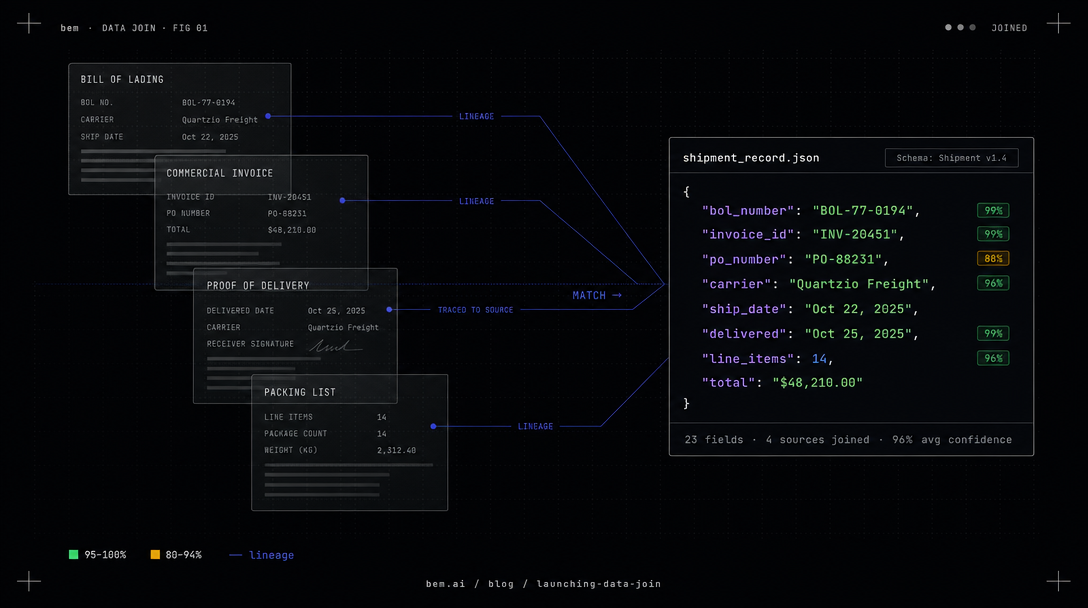
The records your business runs on are almost never one document.
A shipment is a bill of lading, a commercial invoice, and a packing list. A loan file is an application, pay stubs, bank statements, and a credit report. A reconciliation is a custodian statement, an internal ledger, and a set of client allocations. The record that actually drives the decision is assembled from many sources at once, and for most teams the assembly is still done by a person reading every document and retyping the result into one form. Then everyone downstream is asked to trust that the person got it right.
Today we are launching Data Join: a way to match many unstructured documents into one structured record, automatically, with a full visual trail back to every source.
What Data Join is
Data Join is the first n-way matcher for unstructured data built for critical operations. You give it two, three, or ten documents. It returns one record, shaped to your schema, with each field reconciled across the inputs. The documents do not need a shared layout, shared field names, or a shared format. Bem reads each one, decides which document is authoritative for each field, and assembles the result.
It rests on four things that matter when the output feeds a real operation:
- N-way matching. Not two documents, but as many as the record requires. A position reconciled across a custodian statement, a ledger, and an allocation file is one call, not a pipeline you stitch together.
- Visual lineage. Every field in the joined record carries the source document it came from, the page, and the exact region on the page. The trail survives the join.
- Accuracy. Bem reconciles conflicting values across documents instead of blindly taking the first one it sees, and it enforces your schema on the way out.
- Evals and confidence. Join functions run evaluations, on demand or automatically, so you can measure quality on your own documents instead of trusting a vendor benchmark. Per-field confidence is part of the platform, not an afterthought.
See it: three documents, one record
Here is a real shipment. We gave Bem three documents for the same servo motor order, a bill of lading, a commercial invoice, and a proof of delivery. The three share no layout and no field names. Bem matches and reconciles them into one record, and every field points back to the documents, pages, and regions it was found in.
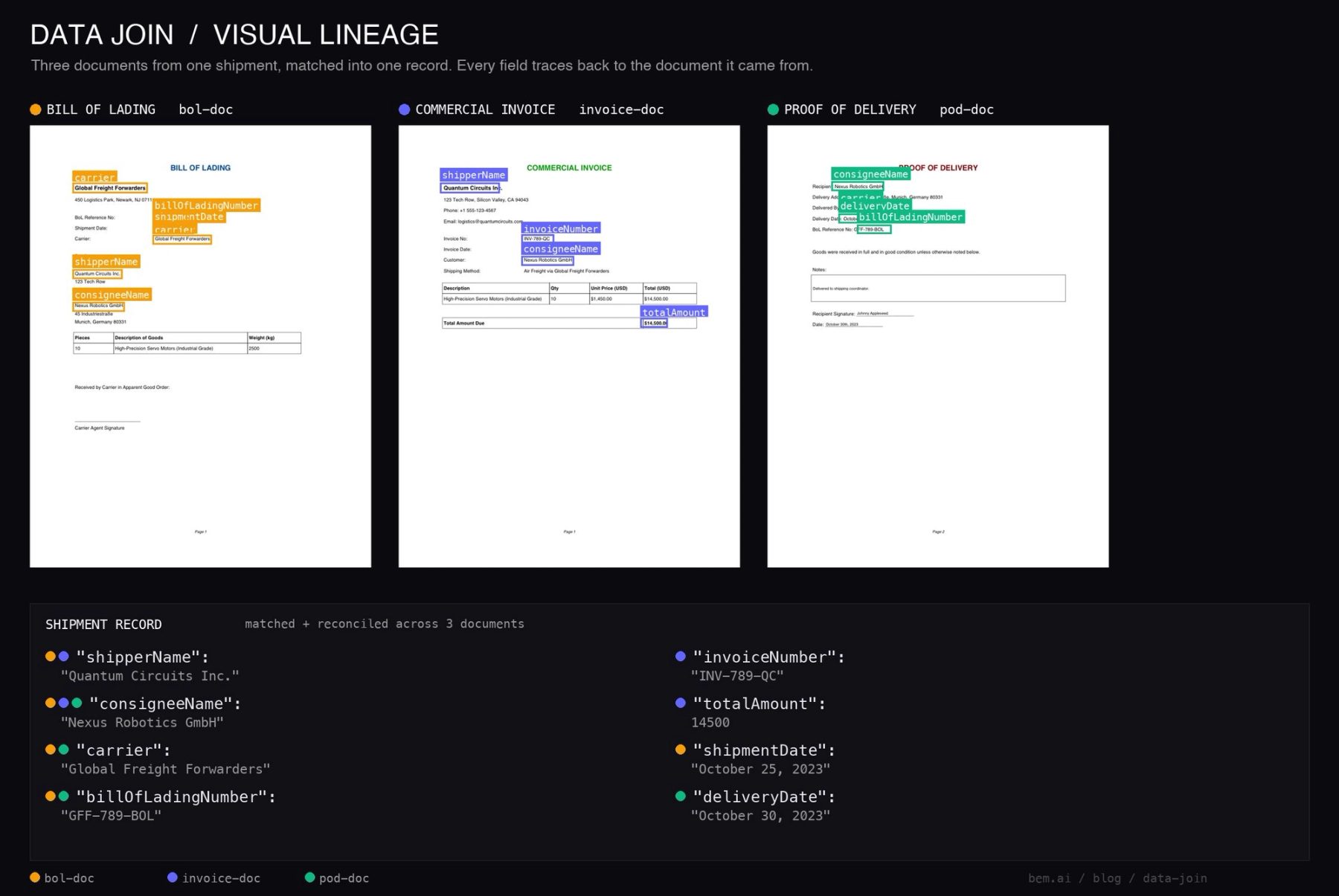
{ "transformedContent": { "shipperName": "Quantum Circuits Inc.", "consigneeName": "Nexus Robotics GmbH", "carrier": "Global Freight Forwarders", "billOfLadingNumber": "GFF-789-BOL", "invoiceNumber": "INV-789-QC", "totalAmount": 14500, "shipmentDate": "October 25, 2023", "deliveryDate": "October 30, 2023" }, "items": [ { "itemReferenceID": "bol-doc", "s3URL": "https://..." }, { "itemReferenceID": "invoice-doc", "s3URL": "https://..." }, { "itemReferenceID": "pod-doc", "s3URL": "https://..." } ], "fieldBoundingBoxes": { "/invoiceNumber": [{ "itemReferenceID": "invoice-doc", "page": 1, "left": 0.366, "top": 0.251, "width": 0.083, "height": 0.012 }], "/totalAmount": [{ "itemReferenceID": "invoice-doc", "page": 1, "left": 0.715, "top": 0.440, "width": 0.067, "height": 0.012 }], "/deliveryDate": [{ "itemReferenceID": "pod-doc", "page": 1, "left": 0.215, "top": 0.204, "width": 0.107, "height": 0.012 }], "/billOfLadingNumber": [ { "itemReferenceID": "bol-doc", "page": 1, "left": 0.366, "top": 0.203, "width": 0.088, "height": 0.012 }, { "itemReferenceID": "pod-doc", "page": 1, "left": 0.269, "top": 0.229, "width": 0.088, "height": 0.011 } ], "/consigneeName": [ { "itemReferenceID": "bol-doc", "page": 1, "left": 0.131, "top": 0.404, "width": 0.141, "height": 0.012 }, { "itemReferenceID": "invoice-doc", "page": 1, "left": 0.366, "top": 0.300, "width": 0.141, "height": 0.012 }, { "itemReferenceID": "pod-doc", "page": 1, "left": 0.194, "top": 0.131, "width": 0.141, "height": 0.012 } ] }}Read fieldBoundingBoxes and the lineage is right there. invoiceNumber and totalAmount came from the invoice. deliveryDate came from the proof of delivery. billOfLadingNumber was found on both the bill of lading and the proof of delivery, so the trail keeps both. And consigneeName appears on all three documents, so Data Join reconciled it and kept a pointer to every place it was found. The image above is that same output drawn back onto the real documents. The boxes are the real coordinates the API returned, not an illustration.
Turn it on with one flag
# 1. Create the join functioncurl -X POST https://api.bem.ai/v2/functions \  -H "x-api-key: $BEM_API_KEY" -H "Content-Type: application/json" \  -d '{    "functionName": "shipment-record",    "type": "join",    "joinType": "standard",    "extraConfig": { "enableBoundingBoxes": true },    "outputSchemaName": "ShipmentRecord",    "outputSchema": { "type": "object", "properties": {      "billOfLadingNumber": {"type":"string"}, "invoiceNumber": {"type":"string"},      "shipperName": {"type":"string"}, "consigneeName": {"type":"string"}, "carrier": {"type":"string"},      "totalAmount": {"type":"number"}, "shipmentDate": {"type":"string"}, "deliveryDate": {"type":"string"}    }, "required": ["billOfLadingNumber", "invoiceNumber"] }  }'
# 2. Call it with as many documents as the record needscurl -X POST https://api.bem.ai/v2/calls \  -H "x-api-key: $BEM_API_KEY" -H "Content-Type: application/json" \  -d '{ "calls": [{ "functionName": "shipment-record", "input": { "batchFiles": { "inputs": [    { "inputType": "pdf", "inputContent": "<base64>", "itemReferenceID": "bol-doc" },    { "inputType": "pdf", "inputContent": "<base64>", "itemReferenceID": "invoice-doc" },    { "inputType": "pdf", "inputContent": "<base64>", "itemReferenceID": "pod-doc" }  ] } } }] }'
The itemReferenceID you assign each input is the thread that runs all the way through to every bounding box in the output.
Where n-way changes the game: finance and reconciliation
Three documents is a clean example. The reason we built Data Join is the messy one, where the count climbs and the sources disagree.
Consider an omnibus account, where one account at a custodian or broker pools the assets of many underlying clients. Reconciling it is a genuinely n-way problem. The custodian statement says one thing, the internal sub-ledger says another, and the client-level allocation files have to add back up to the pooled total. Today a team of operations analysts reconciles these by hand, line by line, across documents that never share a format. It is slow, it is the source of most break investigations, and when a regulator or a client asks "where did this number come from," the answer is a spreadsheet and a person's memory.
Data Join turns that into one call. Match the custodian statement, the ledger, and the allocation files into one reconciled record. Each figure carries the document it came from and the exact line on the page. A break is no longer a hunt. An analyst clicks the disputed balance and the three sources open to the precise rows, color coded by where they disagree.
The same shape shows up across finance and fintech:
- Reconciliation and treasury. Match bank statements, internal ledgers, and payment files into one reconciled view, with every figure traceable to its statement line.
- Lending and underwriting. Assemble an application, pay stubs, bank statements, and a credit report into one underwriting record, and let an underwriter click any value to see which document supports it.
- Claims. Fuse a loss run, a policy, and a stack of receipts into one claim, with a visual provenance chain an auditor can follow in seconds.
- Freight and logistics. Reconcile a bill of lading, a commercial invoice, and a packing list into one shipment record, with every field linked back to the document of record.
The pattern is always the same. Many messy documents go in. One record comes out. Every field on the screen is one click away from the exact place it was found.
The UX this unlocks
This is not a debugging feature. It is something your users see.
Picture the reviewer's screen: the assembled record on the left, the stack of source documents on the right. They click the total. The right pane jumps to the invoice and highlights the amount. They click the shipper, and it switches documents to the bill of lading and highlights the line. The record stops being something a user has to trust and becomes something that proves itself, document by document. With Data Join that is a few lines of frontend code instead of a research project.
Verified, now across documents
We have said for a while that Bem is the foundation for verified AI. Verification has always meant the same thing here. Not a model's confidence in itself, but a path back to the source that a human can walk, plus the evaluations to know it holds up at scale. Data Join extends that from a single document to the multi-document reality your operation actually runs on.
Getting started
Data Join is available today.
- Create a function with
type: joinand call it with two or more documents, each with its ownitemReferenceID. - Set
enableBoundingBoxes: trueto get visual lineage on every field, or toggle it in the dashboard. - Turn on evaluations to measure quality on your own documents.
Bounding boxes are included at no additional cost. Data Join works on PDFs, images, and every document type Bem supports.
If you are at Snowflake Summit 26 in San Francisco this week, come find our booth. Bring your messiest stack of documents and we will match them into one verified record, live, and show you exactly where every field came from.